I sell to overseas buyers from Korea and handle the shipping side on my own. A lot of that work is checking things: comparing rates, reading shipment details, waiting on support replies, remembering to look at a review again. An AI browser agent now does most of that checking. Here’s how the setup works, the rule I treat as the most important, and the line the agent never crosses.
The Setup
Almost every overseas order goes out with FedEx International Priority, and my standard packing unit is a 22kg box. Three tools carry the work:
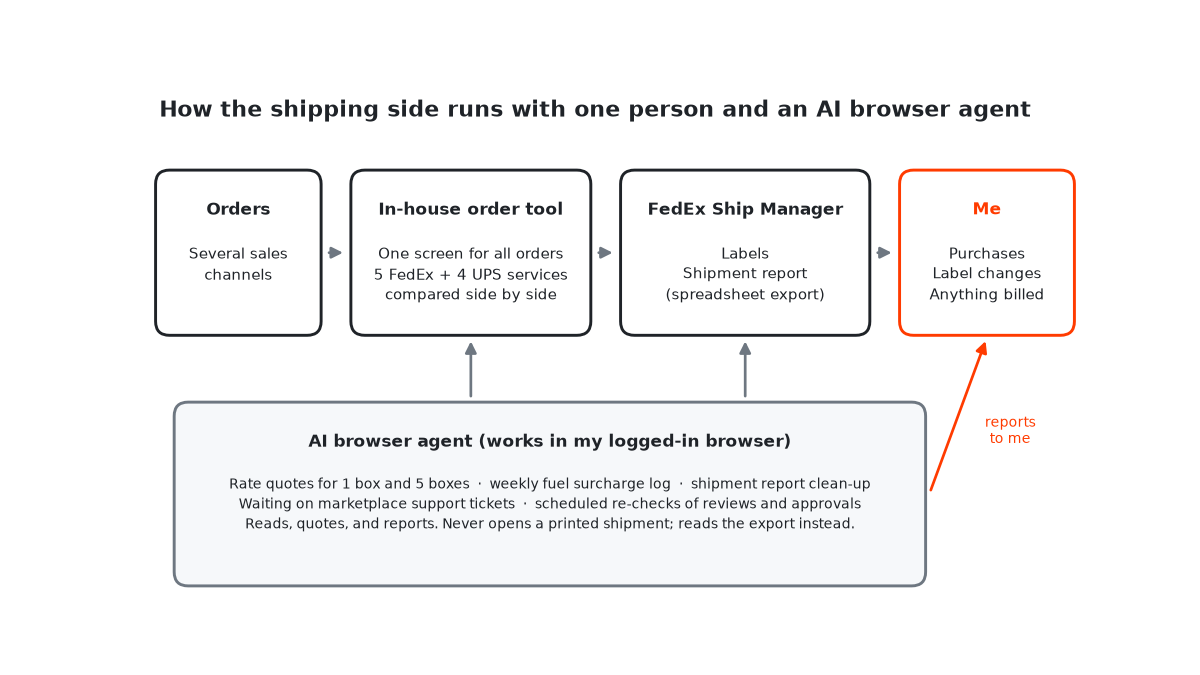
- An in-house order tool. It pulls orders from several sales channels into one screen and compares five FedEx services and four UPS services side by side for a shipment.
- FedEx Ship Manager. Labels are created here, and its downloadable shipment report is my source of truth for what was shipped.
- An AI browser agent. It works inside my logged-in browser, so it can use the same sites I do without separate integrations.
None of these is exotic. What makes the setup work is how the jobs are split between them, and between the agent and me.
Every Rate Check Covers Two Scenarios
When I check a rate, I never ask for one number. I ask for two: one box and five boxes (110kg). Seeing both side by side answers the question I actually have, which is whether to ship now or wait for more orders.
The other check is volumetric weight. A 43×30×25cm box has a volumetric weight of 6.45kg (length × width × height ÷ 5,000), so a full 22kg box is billed on its actual weight. Move to a noticeably bigger box and that can flip, and the quote changes with it. Box size is part of the price, not an afterthought.
What the Agent Does Each Week
- Rate checks for the one-box and five-box scenarios.
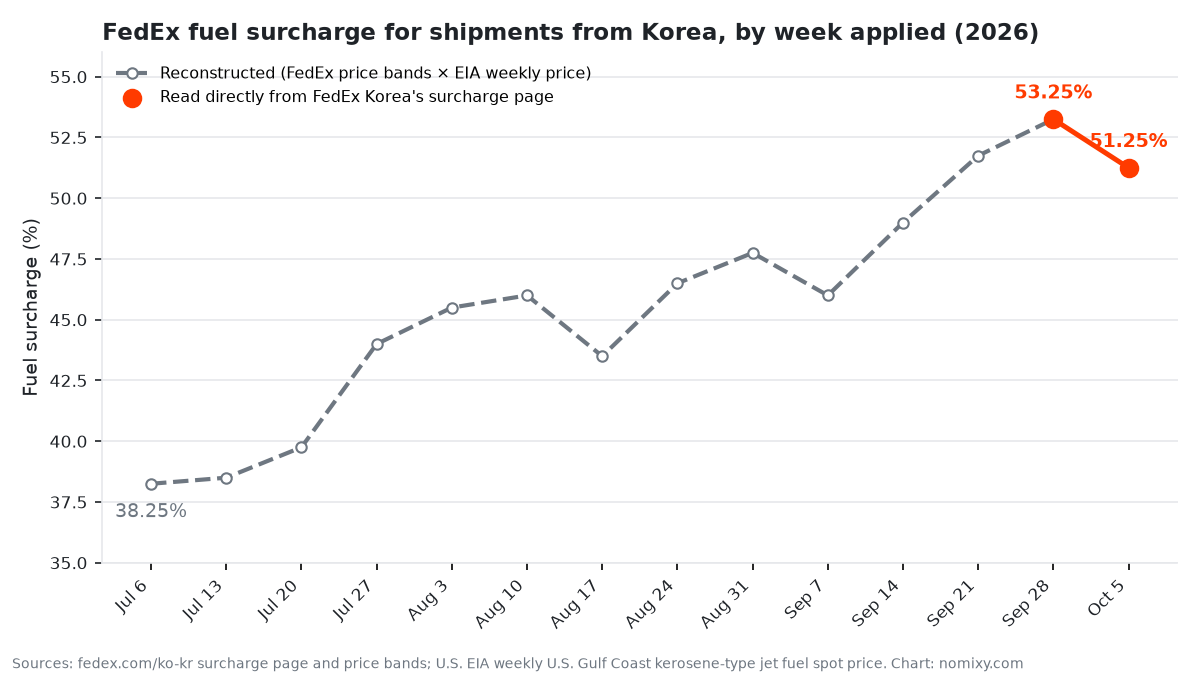
- A weekly fuel surcharge log. The agent records FedEx’s published rate every Monday. (Here’s what a quarter of that data looks like.)
- Shipment report clean-up, turning the exported report into the summary I need.
- Waiting on support tickets. When I have an open ticket with a marketplace, the agent checks it on a schedule. If nothing has changed, it reports one word: “pending.” When an answer arrives, it summarizes the full reply.
- Scheduled re-checks. After I submit something for review, it schedules a follow-up check instead of me remembering to look.
Each of these is a reading or comparing job with a clear output. That’s deliberate.
The Rule That Matters Most: Read the Export, Never Open the Record
One mistake in this setup is both easy to make and hard to undo. In FedEx Ship Manager, opening a shipment that has already been printed with “view” can put you into an edit flow, and that flow can cancel the label and issue a new tracking number.
So the agent never opens shipments. It reads the shipment report instead, which you can download as a spreadsheet from the shipment list. As a bonus, the estimated cost in that report matches the online rate tool for the same weight and dimensions, so it doubles as a check that a rate was looked up with the right inputs.
The broader lesson: if a job only needs information, give the automation a read-only source, even when the live screen is more convenient.
What the Agent Never Does
My order tool has a “process order” button. After one confirmation dialog, it buys stock and charges my card immediately. That button is the reason for my two firmest rules:
- Checking and doing are separate. The tool keeps the check and the action on separate buttons, and when the agent inspects orders it cancels that confirmation dialog every time.
- Money and labels stay with me. The agent reads, quotes, and reports. Purchases, label changes, and anything that changes what I’m billed take a human click.
It’s a small amount of friction, and it’s the part of the setup I would keep if I had to drop everything else.
If You Want to Build Something Similar
You don’t need my tools to copy the pattern. Here’s where I’d start:
- Pick one repetitive check where a wrong answer is cheap to catch. Rate comparisons are a good first job.
- Give the agent read-only sources wherever they exist. Exports, reports, and published pages come before live records.
- Write down what “done” means. “Reported the reply” is a better instruction than “checked the inbox.”
- Log what nobody else keeps. If a number only exists for the current week, start recording it now.
- Keep one human click in front of anything that spends money.
The agent hasn’t replaced judgment in my business. It has replaced a lot of looking, and that turned out to be the part worth automating.