My Microsoft 365 subscription came up for renewal in September 2026: one seat of Business Standard on an annual plan. Before paying, I checked whether a cheaper plan would do the same job. Here’s what the comparison looked like on Microsoft Korea’s official plan pages, and what I decided.
The Plans and Their Korean List Prices
These are Microsoft Korea’s list prices per user per month on an annual commitment, excluding VAT, as I checked them on September 28, 2026. Prices change, so confirm them on Microsoft’s site before you buy.
| Plan | Price (won/user/month) | What it is |
|---|---|---|
| Business Basic | 9,500 | Web and mobile Office apps, business email, Teams |
| Business Basic, without Teams | 7,300 | Same, without Teams |
| Business Standard | 18,900 | Adds the desktop Office apps (22,680 with monthly billing) |
| Business Standard, without Teams | 14,600 | Same, without Teams |
| Business Standard with Copilot | 31,800 | Standard bundled with Copilot Business |
| Business Premium with Copilot | 43,200 | Top Business tier, Copilot included |
| Apps for business | 13,200 | Desktop Office apps and OneDrive; no hosted business email, Teams, or SharePoint |
| Exchange Online Plan 1 | 5,400 | Business email only |
Standard vs. Basic: Only Four Real Differences
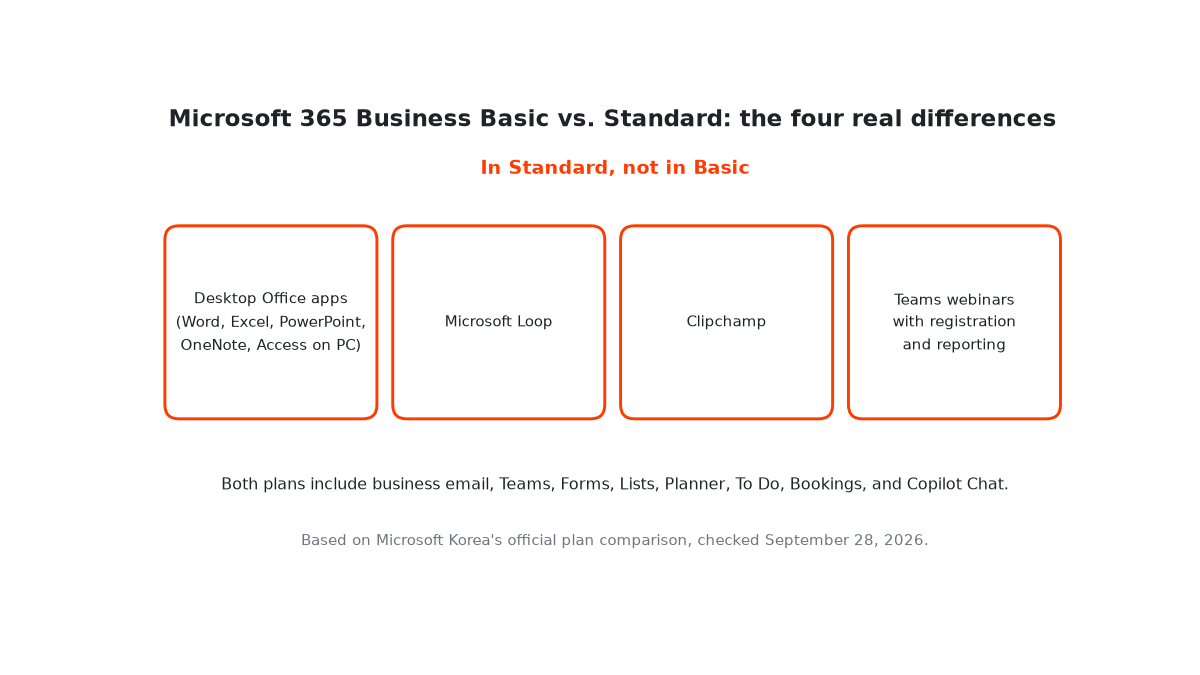
Microsoft’s comparison makes the plans look far apart. When I lined up Business Basic (with Teams) against Business Standard, most of the productivity features matched: Bookings, Forms, Lists, Planner, To Do, and the free Copilot Chat are in both. The differences came down to four things:
- Desktop Office apps. Word, Excel, PowerPoint, OneNote, and Access on PC. Basic has the web and mobile versions only.
- Microsoft Loop.
- Clipchamp.
- Teams webinar hosting with attendee registration and reporting.
If you don’t need any of those four, Basic is the better fit, at about half the price.
Two Changes That Landed This Fall
- Publisher is leaving Microsoft 365. As of October 1, 2026, Publisher is removed from Microsoft 365 subscriptions, according to Microsoft’s notice. If you still have .pub files, they need converting to another format, because subscribers no longer have Publisher to open them.
- Mailboxes doubled on the Business plans. Business Basic, Standard, and Premium mailboxes went from 50GB to 100GB through an add-on Microsoft rolled out between June and September 2026. A standalone Exchange Online Plan 1 mailbox stays at 50GB (Exchange Online limits).
The Pricing-Page Trap
Microsoft Korea’s compare-all page leads with the Copilot-bundled version of Business Standard (31,800 won). The standalone Business Standard price (18,900 won) is on the plan’s own product page. My first pass at the research mixed the two up. If a price looks high, open the individual product page before deciding.
The same research had a second correction. Apps for business does include Forms, even though the comparison card’s short icon list made it look otherwise. It has no hosted business email, Teams, or SharePoint, though. Read each plan’s own “what’s included” section rather than the comparison cards.
Questions to Ask Before You Pick a Plan
The plan that fits depends on a few yes-or-no questions more than on the feature tables:
- Do you edit in the desktop Office apps? If the web versions are enough, Basic covers you.
- Do you host webinars with registration? That’s a Standard feature.
- Do you use Teams at all? If not, the “without Teams” versions cost less for the same everything else.
- Is business email all you need? Exchange Online Plan 1 is the cheapest way to get it, with a smaller mailbox.
- Are you paying for Copilot you don’t use? Check whether the plan you’re on is the bundled version.
What I Decided
I renewed Business Standard for this year. The one switch worth considering is Business Standard without Teams, which keeps the desktop apps, email, OneDrive, SharePoint, Loop, and Clipchamp for 4,300 won less per user per month, about 23% less. It only makes sense if Teams really won’t be needed. Basic would save more, but it drops the desktop apps, which made it the riskier change.
One last note from the renewal itself: after the payment was accepted, the subscription still showed as expired for a few days. That’s why I now check the downstream state, not the payment screen.