A solopreneur tech stack in 2026 can handle marketing, operations, finance, content, and growth for a fraction of what those functions cost in salaries. The tools have quietly gotten good enough that one person can run workflows that genuinely used to require a small team. The bottleneck is no longer access to capability. It is knowing which tools to pick and, more importantly, how to wire them together.
That gap is real and measurable. McKinsey’s State of AI 2025 report found that 88% of organizations now use AI in at least one business function, up from 78% a year earlier. Yet only 39% report any measurable EBIT impact, and in most of those cases the impact is under 5% of total EBIT. Adoption is nearly universal; results are not. The difference comes down to whether you treat AI tools as novelties or build actual workflows around them.
This is the 15-tool stack I would build today if I were starting over, organized into five layers: an AI brain, a content engine, an automation layer, business operations, and a growth stack. Every price below is the publicly listed 2026 rate, and I have flagged where the cheaper tier is genuinely enough.
In This Article
AI Brain: Your Thinking Partners
Every solopreneur stack needs a reasoning layer, and in practice no single model is best at everything. Running everything through one assistant works until you hit its weak spots, so I keep three with clearly different jobs.
1. ChatGPT (Plus, $20/month)
ChatGPT is the generalist. Drafting emails, brainstorming names, generating first-draft standard operating procedures, quick multilingual work. Its custom GPTs are the underused feature for solo operators: you can build one trained on your brand guidelines and tone, then reuse it so output stays consistent without re-prompting from scratch each time. Pricing and tiers are on the official ChatGPT pricing page.
Honest take: it does most things at a solid B-plus level. You will still want specialists for analysis and research, but it comfortably handles the majority of everyday tasks.
2. Claude (Pro, $20/month)
Claude is my pick for long documents, careful analysis, and code. When you need to read a dense contract or regulatory PDF in one pass without losing the thread halfway through, it holds context noticeably better. Its tool-use and connector capabilities are also strong, which matters as more of this work shifts from “AI that advises” to “AI that acts.” See the Claude pricing page for current tiers.
Honest take: less flashy than ChatGPT, but for precision work like technical writing, structured analysis, and reviewing long material, it is the one I reach for.
3. Perplexity (Pro, $20/month)
Perplexity replaced general Google searching for business research. It returns sourced, current answers with citations, which saves the tab-juggling of cross-referencing yourself. As a solo operator you do not have a research analyst, and this is the closest substitute for the time it saves. Its free tier is capable enough to start with; Pro adds more advanced models and higher limits.
Honest take: if you can only buy one AI tool, buy ChatGPT or Claude first. Perplexity earns its place once you are moving at speed and research volume is high.
Content Creation Engine
Building a product in 2026 is the easy part. Getting attention is the hard part. These three tools turn one person into a content studio across text, visuals, and video.
4. Jasper (Creator, from $39/month)
The fair question is why pay for a dedicated AI writer when you already have ChatGPT and Claude. The answer is marketing-specific structure: brand-voice settings, campaign templates, and an editor built for publish-ready output rather than open-ended chat. For high-volume marketing copy, that reduces editing time. Current plans and limits are on the Jasper pricing page.
Gotcha: do not use it for everything. It shines on marketing and blog content. For technical or analytical writing, a general model like Claude does better. Match the tool to the task instead of forcing one tool everywhere.
5. Midjourney and DALL-E ($10-30/month)
Visual content is a classic bottleneck for solo operators. I keep both because they serve different purposes: Midjourney produces polished, artistic visuals for brand content, while DALL-E (through ChatGPT) is faster for functional images, quick edits, and simple diagrams. For most blog featured images, social graphics, and concept mockups, one of the two covers it before you ever commission a designer.
Reality check: AI imagery still struggles with accurate text-in-image, consistent product detail, and brand consistency across long batches. For anything customer-facing where precision matters, plan a human review pass.
6. Opus Clip ($19/month)
Short-form video is non-negotiable, but filming and editing eats time. Opus Clip turns one long recording into multiple short, captioned clips formatted for TikTok, Reels, and Shorts. The realistic workflow is to record one long video, then let it surface and format the strongest segments. You still choose which clips actually ship.
If you are building toward an AI agent-powered solo business, video is how you build trust at scale, because people buy from people they feel they know.
Automation Layer: The Silent Workforce
This is the layer that separates a pile of subscriptions from an actual system. Automation is the connective tissue that turns 15 separate tools into one workflow that runs without you in the loop for every step.
7. Make.com (Core, about $10.59/month annual)
Make is the visual backbone. You build “scenarios” that connect tools through a flowchart-style canvas with no code. A typical one: a new order in Stripe creates a record in Airtable, sends a confirmation email, updates a Notion database, and pings you on a messaging app. That single chain removes the manual data entry that used to happen on every order.
On cost, the math favors Make for volume. Per Zapier’s own 2026 breakdown of Make pricing, the Core plan is roughly $10.59/month billed annually for 10,000 operations, while Zapier’s Professional plan is $29.99/month for 750 tasks. One caveat worth knowing: Make counts “operations” and Zapier counts “tasks,” and a single Zapier task can equal several Make operations, so compare on your actual workflow rather than headline numbers.
8. n8n (self-hosted free, or cloud from $20/month)
n8n is the automation tool I reach for when AI needs to make decisions, not just follow fixed rules. It is open-source and can be self-hosted on a cheap server, which keeps recurring costs low. A practical agentic workflow: an inbound inquiry is routed to a model that classifies intent (question, complaint, reorder, new lead), drafts a response, and either sends low-risk replies automatically or flags sensitive ones for you.
Hard-won lesson: never let an agent auto-send sensitive communications without a human checkpoint. An automation that cheerfully thanks a customer for “feedback” on a defective order does real damage. Keep a human in the loop wherever tone and judgment matter.
9. Zapier (Professional, $29.99/month)
If Make is cheaper per operation, why keep Zapier? Breadth. Zapier has the largest app catalog, and some niche tools connect there and nowhere else. The sensible division: Make for high-volume and complex multi-step automations, Zapier for simple connections to apps it uniquely supports, and n8n for anything involving AI decision-making. You do not need all three on day one; add the second and third only when a real gap appears.
Business Ops: Running a One-Person Company
AI and automation are exciting, but they sit on top of unglamorous infrastructure: payments, structured data, and a knowledge base. Skip these and the rest is built on sand.
10. Stripe (2.9% + $0.30 per transaction)
Stripe is the payments backbone, with multi-currency support, subscription billing, and tax tooling that means you do not need a separate finance system early on. Its real advantage for a solo stack is the API: Make, Airtable, and your agents can all read and react to payment events, which makes Stripe the financial hub rather than just a checkout.
Practical tip: turn on automated invoicing and dunning (failed-payment retries) from the start. Recovering failed subscription charges automatically is money you would otherwise leave on the table chasing manually.
11. Airtable (Team, from $20/month)
Airtable sits between a spreadsheet and a database, which makes it ideal for non-technical operators. Use it as a lightweight CRM, inventory tracker, order log, and content calendar in one base, with custom views per function. A traditional CRM would need expensive customization to fit a niche workflow; Airtable lets you build exactly what you need in an afternoon, and your automations can feed and read it continuously.
12. Notion (Plus, from $10/month)
If Airtable is structured data, Notion is the unstructured knowledge base: SOPs, notes, brand guidelines, vendor terms, plans. Its built-in AI search lets you ask a question across all your documents instead of digging through folders. The combination that works in practice is Airtable for queryable records and Notion for documents and reference material; trying to force everything into one of them gets messy fast.
Growth Stack: Getting Noticed
You can have the best product in the world and it means nothing if nobody knows about it. These three tools focus entirely on distribution, audience, and conversion.
13. Buffer (Essentials, from $6/month per channel)
Social posting is a time trap when done live across platforms. Buffer compresses it into a short batch session: schedule a week of posts across channels, then get back to actual work. Its analytics are the underrated part. Cross-platform reporting often reveals that one channel drives most of your qualified inquiries while another just produces vanity engagement, which lets you shift effort to where it pays.
14. Beehiiv (from $0, paid tiers scale with list)
Email remains one of the few channels you own rather than rent. Beehiiv is built for creator-entrepreneurs, combining newsletter publishing, landing pages, referral programs, and monetization in one place. The built-in referral program is the standout feature for organic list growth.
One note on metrics: be skeptical of headline open rates. Apple’s Mail Privacy Protection auto-loads images, which inflates reported opens. As MailerLite’s 2025 benchmark data notes, averages now sit in the 40%+ range largely because of this, so track click-through and conversion as your real signal.
15. Carrd (Pro, about $19/year)
Per year, not per month. Carrd builds responsive one-page sites in well under an hour: landing pages, launch pages, link-in-bio, registration. It is the antidote to the “still working on the website” excuse that delays launches for months. Pair it with your Stripe checkout and you have a publishable web presence the same day.
Full Cost Breakdown for 2026
Here is what the stack actually costs at published prices, with a budget column (free tiers where they exist) and a full-power column. I am deliberately not putting a dollar figure on “what this replaces in salaries,” because those comparisons depend entirely on your market, role definitions, and volume. The honest framing is simpler: this is a small fixed monthly cost relative to hiring even one part-time person.
| Category | Tool | Budget | Full Plan |
|---|---|---|---|
| AI Brain | ChatGPT Plus | $20/mo | $20/mo |
| Claude Pro | Free tier | $20/mo | |
| Perplexity | Free tier | $20/mo | |
| Content | Jasper | — | $39/mo |
| Midjourney / DALL-E | $10/mo | $30/mo | |
| Opus Clip | Free tier | $19/mo | |
| Automation | Make.com | $10.59/mo | $10.59/mo |
| n8n | Free (self-hosted) | $20/mo | |
| Zapier | Free tier | $29.99/mo | |
| Business Ops | Stripe | 2.9% + $0.30/tx | 2.9% + $0.30/tx |
| Airtable | Free tier | $20/mo | |
| Notion | Free tier | $10/mo | |
| Growth | Buffer | Free tier | $30/mo (5 channels) |
| Beehiiv | Free tier | $42/mo | |
| Carrd | ~$1.60/mo (~$19/yr) | ~$1.60/mo (~$19/yr) | |
| TOTAL MONTHLY | ~$42/mo* | ~$331/mo* | |
The budget column is realistic. You can run a functioning one-person operation for well under $50/month by leaning on free tiers, and only upgrade a tool once its free limits actually constrain you. Resist the urge to buy the full stack before your workflow needs it.
How the Stack Connects (A Real Workflow)
Individual tools are ingredients; workflows are the recipe. Here is how the layers fit together on a typical content-and-operations day.
Content production. Scan industry news in Perplexity, pick an angle, draft in Jasper or Claude, and generate a featured image in Midjourney while the draft is written. Edit the draft yourself, add the image, and schedule it. The editing pass is the non-negotiable human step.
Distribution. Push the post into Buffer to generate platform-specific versions, review and tweak a couple, and schedule the week. The newsletter draft in Beehiiv can be pre-populated by an automation pulling from your saved research.
Operations on autopilot. While you focus on product and customer conversations, automations handle the rest: new orders flow Stripe to Make to Airtable; inquiries get triaged by n8n and a model into auto-responses or flagged items; low-stock alerts fire on thresholds.
Review. Check an Airtable dashboard for the day’s orders, handled inquiries, social stats from Buffer, and list growth from Beehiiv. A model can help you spot patterns worth acting on. The work that remains is the work that should: relationships, product, and judgment calls.
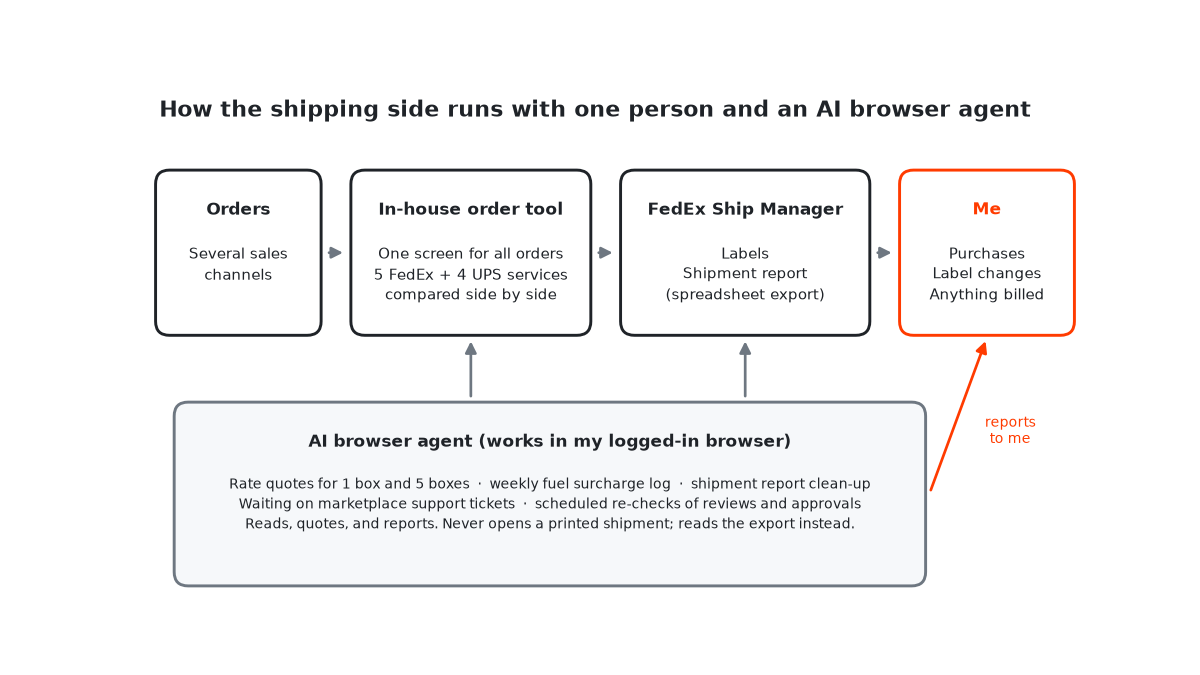
My own day-to-day setup is smaller and more operational than this list: an in-house order tool, FedEx Ship Manager, and an AI browser agent doing the repetitive checks around them. I wrote up how that works for international shipping.
Mistakes Worth Avoiding When Building the Stack
Buying annual plans too early. Annual commitments before you know a tool sticks are how you end up paying for software you abandon. Start monthly and switch to annual only after a few months of consistent use.
Automating before you understand the process. Automate a workflow before you have run it manually enough to know the edge cases (partial shipments, returns, exceptions) and it will break constantly. Do it by hand, document every variation, then automate.
Ignoring the last mile of connections. Great individual tools that do not talk to each other deliver almost none of the promised time savings. The payoff appears only when content, payments, data, and communications are wired together. Treat the integration work as the actual project, not an afterthought.
Build the Stack, Then Build on It
The most useful way to think about a solopreneur tech stack is as your team. Invest in the right tools, train them by building the automation workflows, and periodically check whether each one still earns its place. The ones that do not get cut.
Start small. Pick the three tools that solve your single biggest bottleneck, connect them with one automation, and expand from there. Every workflow you automate returns time, and time is the one resource a solo operator can never buy more of.
Keep Reading
- Free vs Paid AI Tools: A Practical Upgrade Path
- The Solo Founder AI Agent Stack
- MCP Protocol: The Solo Founder’s Secret Weapon