Companies are adopting AI faster than ever, and most of them are seeing no measurable productivity gain from it. That is not a hot take — it is the finding of a major 2026 study, and it has economists reaching for a 40-year-old idea called the productivity paradox.
For solo founders the problem lands differently but just as hard. You sign up for one AI tool, then another, then three more you barely remember. Each promised to save hours. Together they fragment your attention, because you are the only person absorbing the friction — the reviewer, the editor, the integrator, and the decision-maker all at once. The most reliable fix is a deliberately small tool stack. This is a practical playbook for escaping the AI productivity paradox as a one-person business, built on what the research actually says.
In This Article
What the AI Productivity Paradox Actually Is
The idea is not new. Economist Robert Solow captured it in 1987: “You can see the computer age everywhere but in the productivity statistics.” Almost 40 years later we are living the same pattern with AI in place of computers.
The short version: companies adopt AI to get more done, and they do produce more — more emails, more drafts, more analysis — but the output that actually moves the business stays flat. A February 2026 study covered by Fortune, drawing on a survey of roughly 6,000 executives, found that more than 80% of firms reported no measurable productivity gains from AI, and about 90% of managers said AI had no impact on employment levels.
Why? Because AI does not only automate work — it creates new work. A Harvard Business Review analysis put it directly in its title: “AI Doesn’t Reduce Work—It Intensifies It.” The researchers followed 200 employees over eight months and found 83% said AI increased their workload through task expansion, blurred work/non-work boundaries, and more multitasking.
Think about a normal day. You used AI to draft an email — five minutes saved, then ten minutes reviewing and fact-checking. You used AI transcription for a meeting — twenty minutes saved, then thirty organizing the notes. For a solo founder this compounds, because you are the one reviewing every output and switching between every tool. The paradox is not that AI tools fail; they work. It is that stacking tool on tool creates friction that cancels the savings.
The Numbers: Focus Time Hit a 3-Year Low
ActivTrak’s 2026 State of the Workplace report — based on an analysis of 443 million hours of work activity — found focus efficiency, the share of work time spent in uninterrupted concentration, dropped to 60%, a three-year low. The average focus session now lasts about 13 minutes, down roughly 9% since 2023.
The same report shows AI adoption hit 80%, but adoption did not buy back attention — it intensified it. After teams adopted AI, time spent across work applications rose between 27% and 346%, including a 104% jump in email and a 145% jump in chat and messaging. AI accelerated throughput without reducing the underlying workload. Notably, ActivTrak found the highest-productivity group were employees spending only 7–10% of their hours inside AI tools — meaning more AI usage is not automatically better.
For solo founders, the equivalent of “more meetings” is context-switching. Research on attention by Gloria Mark, summarized in her work on interruption, found it can take over 20 minutes to fully return to a task after a switch. If you jump between an AI writer, an AI design tool, an AI analytics dashboard, and an AI inbox assistant all morning, the lost re-focus time alone can swallow your most valuable hours.
Why Fewer AI Tools Usually Wins
There is no magic universal number, but the principle is consistent: the marginal value of each additional AI tool drops fast, while the overhead — setup, learning curve, subscription, occasional bug, and the mental cost of keeping one more system running — keeps accumulating. Past a handful of tools, you start spending more time managing the stack than using it.
A clean way to think about it: most solo businesses need three functions from AI — thinking (writing, research, analysis), creating (design, visuals), and automating (email, scheduling, workflows). Map one tool to each function and you have a routine you can actually master. Add a fourth and a fifth and you start doubling up on functions, which is where the friction creeps back in.
There is a hidden benefit to a small stack: you stop “tool shopping.” Constantly testing new products, watching demos, and reading comparison articles feels productive but is usually procrastination dressed up as research. Commit to a few tools and that time goes back into the work — the same discipline behind digital minimalism, where cutting redundant subscriptions reclaims both money and attention.
The Hidden Cost I Actually Pay: Verification
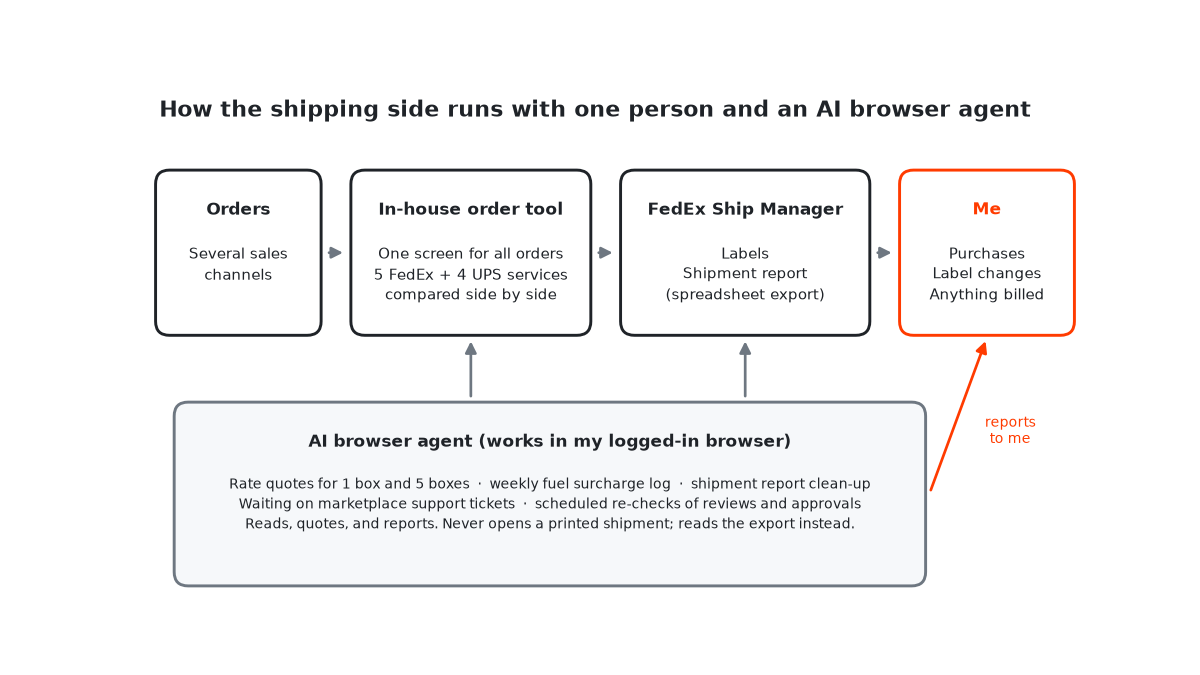
The time AI saves me is real, but some of it goes back into checking that things actually happened. Two examples from my own operation:
- A software subscription invoice showed as paid, but the subscription itself still said “expired” for days. Payment and activation were two different states.
- A marketplace approved my request to release held payouts, but the money only arrived about a week after the approval.
So the rule my agent follows is simple: report the downstream state, not the button you clicked.
A 4-Step Fix for the AI Productivity Paradox
Here is the audit I use, and it takes about a Saturday morning.
Step 1 — Audit everything. Open your bank and card statements and list every AI subscription, its monthly cost, and how many hours per week you actually use it. The forgotten ones quietly running in the background are usually the first easy cuts.
Step 2 — Score each tool 1–5. Ask: “If this disappeared tomorrow, how much would my business suffer?” Anything you score a 1 (you would not notice) gets cut immediately.
Step 3 — Consolidate overlapping functions. Writing, brainstorming, and research can usually live in one strong assistant. Two scheduling tools doing the same job is one too many. Collapse duplicates.
Step 4 — Set a one-in, one-out rule. Before adding any new tool, wait 30 days. If you still want it, you must drop an existing tool to make room. This single constraint kills impulse subscriptions and protects your focus.
The money savings are nice, but the real win is fewer reflexive tool-reaches and longer stretches of deep work. When you are not comparing outputs across three assistants and wondering which version is “better,” you just write, edit, and ship. The decision fatigue drops.
The point that takes longest to internalize is depth over breadth. Most people switch tools the moment one feels limiting, when the real limit is usually their own fluency with it. Take a single capable assistant: learning its project files, custom instructions, reusable prompts, and document handling deeply will save you more hours than any fifth subscription. The same is true on the automation side — one well-built workflow in a tool like Make, maintained and trusted, beats five half-configured ones you have to babysit. Tools reward the person who goes deep, not the person who collects.
There is also a protective effect against the intensification trap the research describes. If AI quietly expands your workload by making every task feel accessible, a small, deliberate stack acts as a natural brake. You cannot spin up five parallel AI side-projects at midnight if you have not installed the five tools to do it with. Constraint, here, is a feature. The founders who stay sane with AI are not the ones with the most tools — they are the ones who decided, on purpose, what their AI is and is not allowed to touch. A smaller stack is easier to secure, easier to audit, and easier to hand off if you ever bring on help, which is one more quiet reason the lean approach compounds over time rather than working against you.
Building Your Minimum Viable AI Stack
If you run just a few AI tools, which ones? It depends on your business, but the pattern across solo operators is clear: cover thinking, creating, and automating, and keep cost low — the specifics are laid out in the 2026 solopreneur tech stack. Here are three example stacks with verified 2026 pricing.
| Function | Budget | Mid-Range | Power |
|---|---|---|---|
| Thinking | Claude Pro ($20) | Claude Pro ($20) | Claude Pro + Perplexity ($40) |
| Creating | Canva Free ($0) | Canva Pro (~$15) | Canva Pro + Midjourney (~$25) |
| Automating | Make Free ($0) | Make Core (~$11) | Make Pro (~$18) |
| Approx. total | ~$20/mo | ~$46/mo | ~$83/mo |
Even the power stack costs less than what many people quietly spend on tools they barely touch. The budget version covers most of what a solo founder actually needs. The principle is depth over breadth: learning one assistant’s project files, custom instructions, and shortcuts deeply will save more time than any additional subscription. Pick one tool per function, commit for 90 days, and if you feel limited, swap rather than stack.
Frequently Asked Questions
What is the AI productivity paradox?
It is the gap between AI adoption and actual productivity gains. Despite widespread use, measurable output per worker stays flat or declines — echoing Robert Solow’s 1987 observation that you could see the computer age everywhere except in the productivity statistics.
How many AI tools should a solo founder use?
As few as cover your core functions — thinking, creating, and automating — usually a small handful. Beyond that, time lost to context-switching, configuration, and management tends to outweigh the time saved. Favor depth with fewer tools over shallow use of many.
Does consolidating AI tools hurt growth?
Generally no. Keeping the tools that cover your highest-value tasks and dropping the rest tends to maintain or improve output quality, because growth comes from focused execution rather than from owning more software.
What’s the best single AI tool for solopreneurs in 2026?
If you can only pick one, a capable assistant for writing, research, and analysis gives the most flexibility — Claude and ChatGPT are the strongest options. Pair it with a free design tool like Canva and a free automation platform like Make for a complete stack under roughly $25/month.
The AI productivity paradox is real, and it is fixable. As a solo founder you have an edge corporations lack: you can audit, consolidate, and simplify in a single afternoon — no committees, no procurement. Start with the audit this weekend. Score each tool honestly, cut what is not earning its keep, and you will reclaim the one thing AI keeps quietly eating: your attention.
Keep Reading
- The $150/Month AI Stack for Solo Founders
- AI Email Assistants for Solopreneurs
- Free vs Paid AI Tools: A Practical Upgrade Path