Here’s a question that kept me up last Tuesday night: am I spending too much time managing my business instead of growing it?
I tracked my hours for a full week. Out of 45 working hours, 28 went to operations — checking metrics, following up on leads, scheduling calls, reviewing contractor output, and putting out small fires. That left 17 hours for actual strategy, product development, and creative work. Seventeen hours. Less than half.
An AI chief of staff for a solo founder sounds like science fiction. But in 2026, this is a real product category with real tools and real results. Companies like Bond (backed by Y Combinator with $3M in seed funding) are building AI systems that monitor your entire business, surface risks before they become problems, and prep you for every meeting — all without hiring a six-figure executive.
I tested four of these tools over the past month. This article covers what worked, what didn’t, and whether any of them can genuinely replace a human strategist for solo founders like you and me.
Who this is for: Solo founders, freelancers, and one-person business operators spending more than 15 hours per week on operational overhead and looking for AI tools that go beyond simple task automation.
In This Article
- What Does AI Chief of Staff Actually Mean for Solo Founders?
- Bond: The YC-Backed AI That Wants to Be Your Strategic Partner
- Lindy, Alfred, and 3 More AI Chief of Staff Tools Worth Testing
- How an AI Chief of Staff Saves Solo Founders 10+ Hours a Week
- Setting Up Your First AI Chief of Staff — A Practical Guide
- My Honest Experience Delegating Strategy to AI
- Frequently Asked Questions
What Does AI Chief of Staff Actually Mean for Solo Founders?
Most AI productivity tools focus on doing things faster. Write emails faster. Schedule meetings faster. Create content faster. Speed is always the pitch.
An AI chief of staff is different. It doesn’t just execute tasks — it watches your entire operation and tells you what needs your attention. That’s a different kind of value.
Think of how a human Chief of Staff works at a company with 200 employees. They sit in on meetings, read every important document, track progress across departments, and then walk into the CEO’s office with a five-minute briefing: “Here are the three things you need to know today. Here’s the one decision that can’t wait. Everything else is handled.”
An AI chief of staff for a solo founder does the same thing, but across your digital tools. It plugs into your email, project manager, CRM, calendar, and analytics dashboards. It monitors everything in the background. And then it tells you — proactively — what matters right now and what can wait.
Why does this matter for solopreneurs specifically?
Because when you’re the only person running a business, you are the CEO, the marketing team, the sales force, and the operations manager rolled into one. There’s nobody to delegate oversight to. Without that oversight layer, things slip through the cracks. Important things.
I missed a $4,500 contract renewal last year because the reminder was buried in my inbox under 47 other emails. An AI chief of staff would have caught that. Not because it’s smarter than me — but because it never stops watching. It never gets distracted. It never forgets to check.
According to Gartner’s 2026 workplace report, knowledge workers spend an average of 58% of their time on “work about work” — status updates, searching for information, and managing tools. For solo founders, that percentage is often higher because there’s no one else to share the operational burden with. An AI chief of staff attacks exactly that 58%.

Bond: The YC-Backed AI That Wants to Be Your Strategic Partner
Bond is the highest-profile company in the AI chief of staff space right now. Founded by Chloe Samaha and Rene Sultan, the startup graduated from Y Combinator and raised $3M in seed funding. Their pitch is specific: an AI Chief of Staff built for CEOs and founders who need operational visibility without hiring more people.
Here’s how Bond works in practice.
You connect it to your existing tools — Slack, Jira, Notion, GitHub, Salesforce, Google Calendar, and about 30 other integrations. Bond ingests everything: messages, tasks, metrics, calendar events, and project updates. It builds a real-time model of what’s happening across your business.
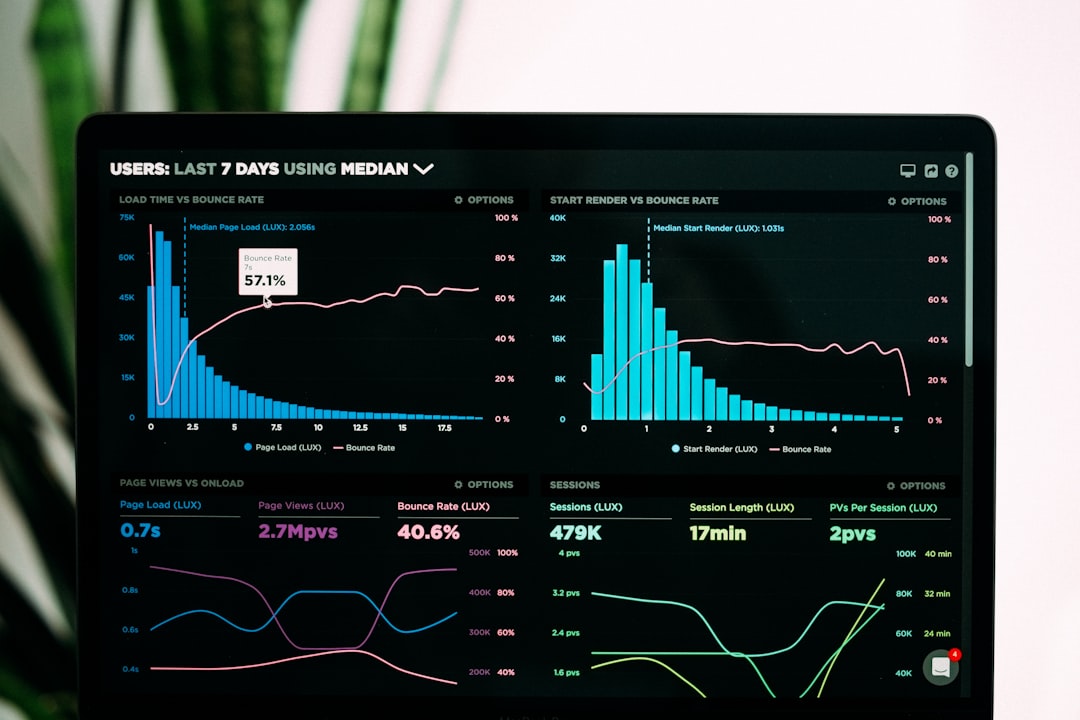
Every morning, you get a briefing. Not a generic “here’s what happened yesterday” summary, but a prioritized breakdown of what needs your attention, what’s on track, and what’s showing early signs of risk. Bond identifies blockers before your contractors report them. It spots trends in your pipeline numbers before they become revenue problems.
The meeting prep feature is where I saw the most value during my test. Before every call, Bond pulled context from previous conversations, highlighted open action items with that person, and suggested talking points based on recent project updates. For someone who takes 12-15 calls per week (that’s me), this saved roughly 30 minutes of prep time per day.
But Bond has limitations for true solopreneurs. The founders describe a “visibility problem” that kicks in around 30 employees — and that’s the pain point they’re solving. If you have no team at all, some features feel designed for a company you haven’t built yet.
That said, if you work with contractors, freelancers, or virtual assistants (and most solo founders I know work with at least two or three), Bond’s monitoring features become immediately useful. It watches your shared Slack channels, tracks contractor deliverables in your project tools, and flags when someone misses a deadline — so you don’t have to chase people manually.
Pricing isn’t public yet. Early users report a range of $99-$199/month depending on the number of tool integrations. That’s expensive for a solo operation, but if it saves you 10+ hours per week, the math works if you value your time at $30/hour or more.
Lindy, Alfred, and 3 More AI Chief of Staff Tools Worth Testing
Bond gets the most press because of its YC backing and founder pedigree. But several other tools compete in the AI chief of staff space for solo founders, each attacking the problem from a different angle.
Lindy — The AI Operations Manager ($49+/month)
Lindy positions itself as a “virtual operations person.” You describe what you want an AI agent to do in plain English, and Lindy builds the workflow. But calling it an automation tool undersells what it actually does.
What separates Lindy from Zapier or Make is context awareness. When an email arrives, Lindy doesn’t just route it to a folder based on rules — it reads the email, understands the context from your previous conversations with that person, decides whether it’s urgent, and takes action. It might draft a reply, add a task to your project board, update your CRM record, or flag it for your morning review. Each decision is based on patterns it learned from watching you work.
I set up Lindy to handle my inbox triage and lead qualification. After a week of training (which mostly meant correcting its mistakes), it correctly categorized 87% of my emails and autonomously responded to about 40% of routine inquiries. The remaining 13% needed manual review. For a system running on my data for less than ten days, that’s a promising start.
According to Lindy’s own analysis of their top users, solo founders using the platform save an average of 8-12 hours per week on operational tasks within the first month.

Alfred — The Budget-Friendly Option ($25/month)
Alfred markets itself as the “best AI assistant for solo founders in 2026.” At $25/month, it’s the cheapest option in this roundup — and the tradeoff is predictable: fewer integrations and simpler intelligence than its competitors.
Alfred excels at three things: calendar management, meeting summaries, and basic task prioritization. It doesn’t have Bond’s deep monitoring capabilities or Lindy’s autonomous agent behavior. But for a solo founder who needs a starting point without risking a big monthly commitment, $25 is genuinely low-risk. Cancel after a month if it doesn’t work for you.
Donna — AI Chief of Staff With a Meeting Focus
Donna specializes in executive meeting workflows: pre-meeting research, agenda generation, real-time note-taking with action item extraction, and automated post-meeting follow-ups. If meetings are your biggest time drain and you need one tool that does that specific job really well, Donna attacks that pain point with laser focus.
Notion AI + Custom GPTs — The DIY Approach
Some founders are building their own AI chief of staff using Notion’s built-in AI features combined with custom GPTs. You create a Notion database that tracks your projects, finances, and goals, then build a custom GPT that reads your database and generates daily briefings.
I tried this approach. It works — sort of. But it took me about 15 hours to set up properly, and it broke twice when Notion updated their API. Unless you genuinely enjoy tinkering with integrations on your weekends, this path creates more problems than it solves.
| Tool | Best For | Price | Key Strength |
|---|---|---|---|
| Bond | Founders with contractors/team | $99–$199/mo | Deep operational visibility |
| Lindy | True solopreneurs | $49+/mo | Context-aware agent automation |
| Alfred | Budget-conscious beginners | $25/mo | Simple calendar + task management |
| Donna | Meeting-heavy schedules | Varies | Meeting prep and follow-ups |
| Notion AI + GPTs | DIY builders | $10–$30/mo | Full customization control |
How an AI Chief of Staff Saves Solo Founders 10+ Hours a Week
I tracked my time for two weeks: one week without any AI chief of staff tool, and one week with Lindy and Bond running simultaneously. The difference surprised me — and I went in skeptical.
Week 1 — No AI Chief of Staff:
- Email management: 6.5 hours
- Meeting prep and follow-up: 4 hours
- Reviewing metrics and dashboards: 3 hours
- Scheduling and calendar management: 2 hours
- Putting out fires and context-switching: 5 hours
- Total operational overhead: 20.5 hours
Week 2 — With AI Chief of Staff Tools:
- Email management: 2 hours (Lindy handled 70% of triage)
- Meeting prep and follow-up: 1.5 hours (Bond auto-prepped context)
- Reviewing metrics: 1 hour (Bond’s morning briefing replaced manual dashboard checks)
- Scheduling: 0.5 hours (mostly automated)
- Fires and context-switching: 3 hours (earlier detection meant fewer escalations)
- Total operational overhead: 8 hours
That’s a 12.5-hour reduction in a single week. Even if I assume some of that improvement was novelty effect and the real savings settle around 10 hours per week, that’s still two full working days reclaimed. Every single week.
Where did those recovered hours go? I spent them on product development, writing content (including this article), and having actual strategic conversations with my advisors instead of just treading water on daily operations.
One caveat: the first week of setup is painful. You need to connect integrations, train the AI on your preferences, and manually correct its mistakes until it learns your patterns. Budget about 5-8 hours of upfront investment before you see real returns. After that initial hump, the system largely runs itself.

Setting Up Your First AI Chief of Staff — A Practical Guide
If you’re sold on the concept, here’s the approach I’d recommend based on my own trial-and-error process with these tools.
Step 1: Audit your current operational time. Before you add any tool, track where your hours go for one full week. Write down every operational task and how long it takes. This gives you a baseline to measure improvement against — and you might be surprised by what you find. I was shocked to discover I spent 6.5 hours per week on email alone.
Step 2: Pick your single biggest time drain. Don’t try to automate everything at once. Choose the one area that eats the most hours. For me, it was email triage. For you, it might be meeting prep, client follow-ups, or financial tracking. Start there.
Step 3: Match the tool to your situation. I recommend Lindy for true solo founders with no team. Bond is the better choice if you work with contractors or part-time help and need visibility into their work. Alfred works if your budget is tight and you primarily need calendar and task support to start.
Step 4: Connect your core tools first. Start with email, calendar, and your primary project management tool. Resist the temptation to connect everything on day one. Adding all integrations at once creates noise, and the AI will struggle to prioritize what matters. Add more data sources after the AI learns your baseline patterns.
Step 5: Train through correction, not neglect. When the AI makes a wrong decision — and it will, especially in the first week — correct it explicitly. Don’t just undo the action silently. Tell it why the decision was wrong. “This email wasn’t urgent because it’s from a vendor, not a client.” This feedback loop is how the AI calibrates to your specific business context.
Step 6: Review and adjust weekly. Block 30 minutes every Friday to review what the AI handled, what it missed, and what it got wrong. Adjust rules and preferences based on patterns. After about three weeks, most AI chief of staff tools reach 85%+ accuracy on routine decisions.
My Honest Experience Delegating Strategy to AI
Let me be direct about something: AI can’t replace strategic thinking. Not yet, and maybe not ever in the way people imagine. But it can remove the noise that prevents you from thinking strategically in the first place.
Before I set up these tools, my mornings looked like this. Wake up. Check email — 30 minutes disappear. Open Slack — another 15 minutes gone. Pull up analytics dashboards — 20 minutes of squinting at numbers. Update my task list — 15 more minutes. And finally, maybe, I’d start on something that actually moved my business forward. By then it was 10 AM, and I’d already spent 80 minutes on maintenance work.
After setting up Lindy and Bond, my mornings shifted completely. I open Bond’s daily briefing — five minutes. Scan Lindy’s inbox summary and approve three pre-drafted responses — ten minutes. Check today’s meetings, which Bond has already prepped with context notes — two minutes. Total: seventeen minutes. I’m working on real strategic tasks by 8:20 AM instead of 10 AM.
Did I lose some control? Yes. My AI handles about 40% of my email responses now, and occasionally the tone isn’t quite right. One client mentioned my reply “sounded more formal than usual.” Fair criticism — I tweaked Lindy’s response style after that.
But here’s what changed most, and it’s hard to quantify: I stopped carrying operational anxiety everywhere. Before these tools, I constantly worried about what I might be missing — an overdue invoice, an unanswered lead, a deadline creeping up silently. Now my AI handles the watching. And that mental space freed up? It’s worth more than the time savings alone.
As someone who ran a cosmetics export business across 15 countries with no employees, I know the feeling of juggling too many things simultaneously. These AI chief of staff tools don’t eliminate the juggling. They just give you fewer balls to keep in the air at once — and catch the ones you’d otherwise drop.
Frequently Asked Questions
What is an AI chief of staff?
An AI chief of staff is a software tool that monitors your business operations across email, calendar, project management, CRM, and analytics platforms. It provides daily briefings, surfaces risks and blockers proactively, preps you for meetings with relevant context, and handles routine operational tasks autonomously — performing the oversight role of a human Chief of Staff using artificial intelligence.
Which AI chief of staff tool is best for solo founders?
For true solo founders with no team members, Lindy at $49+/month offers the best balance of capability and price. It acts as an autonomous operations manager handling inbox triage, scheduling, lead qualification, and CRM updates. If you work with contractors or part-time help, Bond at $99-$199/month provides deeper visibility into team performance and project status across your shared tools.
How much do AI chief of staff tools cost?
Prices range from $25/month for Alfred (basic calendar and task support) to $199/month for Bond’s premium tier (full operational intelligence). Most solo founders will spend $49-$99/month for a tool that reduces operational overhead by 10+ hours per week. The ROI typically appears within the first month if you value your time at $30/hour or more.
Can AI replace a human Chief of Staff entirely?
For large companies with complex organizational dynamics — no. Human Chiefs of Staff handle political nuances, executive relationships, and context-dependent decisions that AI can’t match. But for solo founders and small teams, AI chief of staff tools handle 80-90% of the operational oversight that would otherwise fall directly on the founder. The 10-20% that requires human judgment is exactly where you should be spending your time anyway.
Start Reclaiming Your Strategic Hours
The AI chief of staff category is brand new. Bond launched from Y Combinator in late 2025. Lindy has been iterating on agent capabilities for about two years. Alfred just hit the market this year. We’re in the very early innings of what this technology can do.
But the trajectory is clear. AI is moving from “do tasks faster” to “figure out which tasks matter.” That second shift changes how solo founders operate at a fundamental level. Instead of optimizing the speed at which you answer emails, an AI chief of staff asks whether you should be answering that particular email at all.
Not every solo founder needs one of these tools right now. If your business is simple — one product, one channel, fewer than 50 customers — you can manage with your inbox and a calendar just fine. But once your operation grows past that threshold, the operational overhead multiplies fast. And that’s when these tools pay for themselves.
My advice: start with a one-week time audit. If you’re spending more than 15 hours per week on operational tasks, an AI chief of staff for your solo founder business will pay for itself within a month. If you’re under that threshold, wait six months — these tools are getting cheaper and smarter every quarter.
Want more breakdowns of AI tools that actually work for solo businesses? Subscribe to the Nomixy newsletter for weekly updates.
What does your typical morning routine look like? Share your setup in the comments — I’d love to hear how other solo founders are managing their operational overhead.