My Microsoft 365 subscription came up for renewal in September 2026: one seat of Business Standard on an annual plan. Before paying, I checked whether a cheaper plan would do the same job. Here’s what the comparison looked like on Microsoft Korea’s official plan pages, and what I decided.
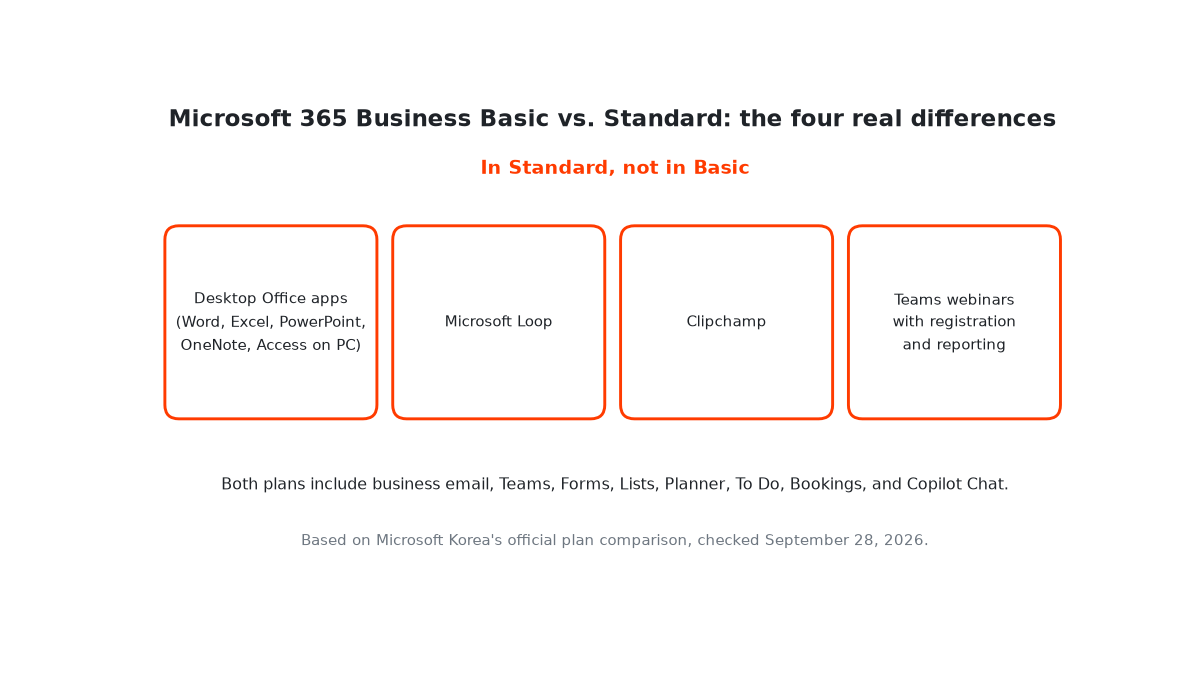
The four features that separate Business Standard from Business Basic.
The Plans and Their Korean List Prices
These are Microsoft Korea’s list prices per user per month on an annual commitment, excluding VAT, as I checked them on September 28, 2026. Prices change, so confirm them on Microsoft’s site before you buy.
Plan
Price (won/user/month)
What it is
Business Basic
9,500
Web and mobile Office apps, business email, Teams
Business Basic, without Teams
7,300
Same, without Teams
Business Standard
18,900
Adds the desktop Office apps (22,680 with monthly billing)
Business Standard, without Teams
14,600
Same, without Teams
Business Standard with Copilot
31,800
Standard bundled with Copilot Business
Business Premium with Copilot
43,200
Top Business tier, Copilot included
Apps for business
13,200
Desktop Office apps and OneDrive; no hosted business email, Teams, or SharePoint
Exchange Online Plan 1
5,400
Business email only
Standard vs. Basic: Only Four Real Differences
Microsoft’s comparison makes the plans look far apart. When I lined up Business Basic (with Teams) against Business Standard, most of the productivity features matched: Bookings, Forms, Lists, Planner, To Do, and the free Copilot Chat are in both. The differences came down to four things:
Desktop Office apps. Word, Excel, PowerPoint, OneNote, and Access on PC. Basic has the web and mobile versions only.
Microsoft Loop.
Clipchamp.
Teams webinar hosting with attendee registration and reporting.
If you don’t need any of those four, Basic is the better fit, at about half the price.
Two Changes That Landed This Fall
Publisher is leaving Microsoft 365. As of October 1, 2026, Publisher is removed from Microsoft 365 subscriptions, according to Microsoft’s notice. If you still have .pub files, they need converting to another format, because subscribers no longer have Publisher to open them.
Mailboxes doubled on the Business plans. Business Basic, Standard, and Premium mailboxes went from 50GB to 100GB through an add-on Microsoft rolled out between June and September 2026. A standalone Exchange Online Plan 1 mailbox stays at 50GB (Exchange Online limits).
The Pricing-Page Trap
Microsoft Korea’s compare-all page leads with the Copilot-bundled version of Business Standard (31,800 won). The standalone Business Standard price (18,900 won) is on the plan’s own product page. My first pass at the research mixed the two up. If a price looks high, open the individual product page before deciding.
The same research had a second correction. Apps for business does include Forms, even though the comparison card’s short icon list made it look otherwise. It has no hosted business email, Teams, or SharePoint, though. Read each plan’s own “what’s included” section rather than the comparison cards.
Questions to Ask Before You Pick a Plan
The plan that fits depends on a few yes-or-no questions more than on the feature tables:
Do you edit in the desktop Office apps? If the web versions are enough, Basic covers you.
Do you host webinars with registration? That’s a Standard feature.
Do you use Teams at all? If not, the “without Teams” versions cost less for the same everything else.
Is business email all you need? Exchange Online Plan 1 is the cheapest way to get it, with a smaller mailbox.
Are you paying for Copilot you don’t use? Check whether the plan you’re on is the bundled version.
What I Decided
I renewed Business Standard for this year. The one switch worth considering is Business Standard without Teams, which keeps the desktop apps, email, OneDrive, SharePoint, Loop, and Clipchamp for 4,300 won less per user per month, about 23% less. It only makes sense if Teams really won’t be needed. Basic would save more, but it drops the desktop apps, which made it the riskier change.
An address can cause more trouble than the box. How it’s written, whether the carrier can validate it, and whether the carrier classifies it as a home or a business all affect when a package arrives, and some of them change what you pay. Here’s what I’ve learned to check before a box leaves Korea.
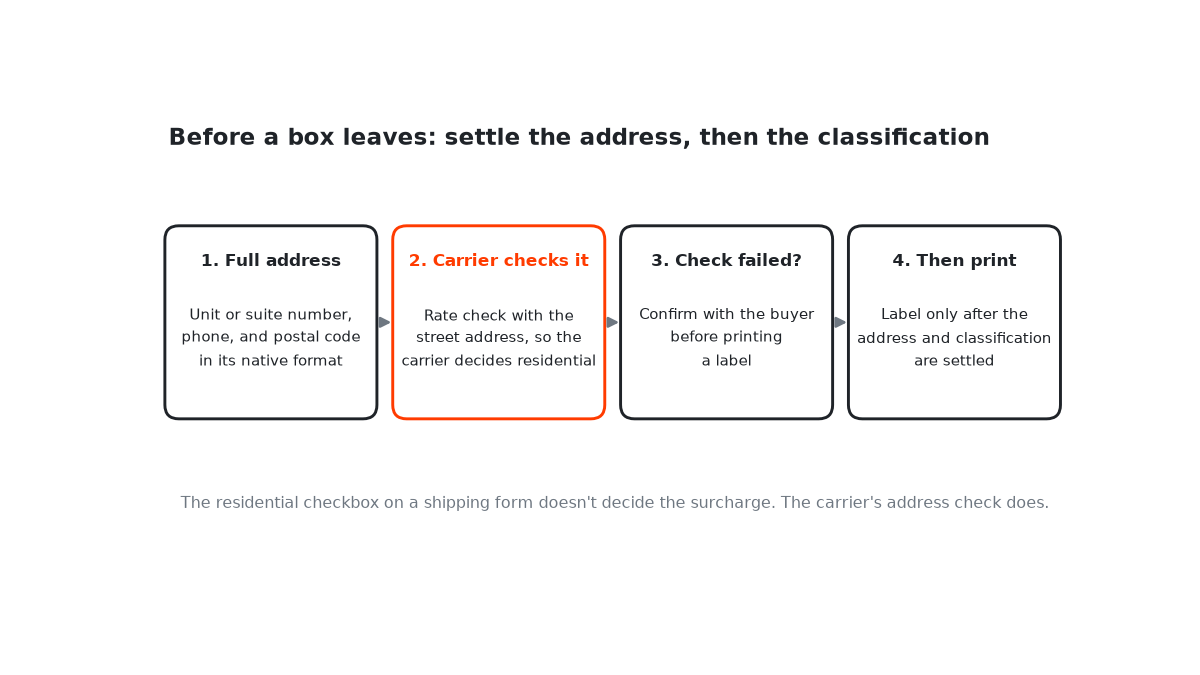
Settle the address and its classification before the label, not after.
Residential Is the Carrier’s Call, Not a Checkbox
Shipping forms often have a “this is a residential address” checkbox, and it’s tempting to think that decides the residential surcharge. From what I’ve seen in my own FedEx account, it doesn’t. FedEx can apply its residential delivery surcharge based on its own address validation, however the checkbox was set.
So when I check a rate, I let the carrier classify the address first. My rate lookup passes the street address to the carrier’s address check and uses the answer. A quote without a street address leaves out any residential surcharge, which is why I don’t rely on address-less quotes for home deliveries.
There’s a second reason to care. FedEx applies its weekly fuel surcharge on top of certain other surcharges, and residential delivery is one of them. A residential classification adds cost twice.
When Validation Fails
A failed validation doesn’t always mean a bad address. In September 2026, FedEx’s address check failed on a U.S. address I was rating, which left the residential question unanswered. When that happens, confirm the details with the buyer before guessing: street number, unit or suite, city, state or province, and postal code.
It’s worth doing before the label rather than after. FedEx lists address correction as its own surcharge, so a fix at the planning stage is the cheap one.
Write the Address the Way the Destination Expects
Copy the buyer’s address exactly, then check it. Don’t reorder or abbreviate it from memory. Address formats differ by country.
Keep the postal code in its native format. In some countries, hyphens and spaces are part of the code.
Never drop the unit, suite, or apartment number. FedEx’s address validation even reports “suite required but missing” as a result of its own.
Include a phone number. Carriers ask for it so they can reach the recipient when a delivery can’t be completed.
For Korean addresses, use the official English form. Korea’s road-name address service has an English address search that gives the romanized form the postal system uses.
Romanizing a Korean Address: The Order Flips
Korean addresses are written from the largest unit to the smallest: province or city, then district, then road name, then building number, then the unit. The English form runs the other way, from the unit and building number up to the city, followed by the postal code and the country. Mixing the two orders is one of the easiest ways to confuse a carrier’s system or a foreign courier reading the label.
Road names are romanized as one word with the suffix attached, such as “-ro”, “-daero”, or “-gil”, and in the English form the building number comes before the road name. Rather than romanizing by ear, copy the form the official English search returns. Spelling variations are what make validation fail.
A Tool for Converting Addresses to English
Disclosure: I also run addran.com, a tool I built that converts addresses written in many languages into a standard English form using Google Maps geocoding. It’s useful for getting a consistent English version to start from, but the same rule applies: confirm the result with the recipient, and let the carrier validate it.
A Simple Pre-Shipment Address Check
Get the full address, including the unit number, and a phone number.
Run the rate check with the street address so the carrier classifies it.
If validation fails, confirm with the buyer before printing anything.
Print the label only after the address and its classification are settled.
None of this is complicated. It just has to happen before the label, every time.
Every time I plan an international shipment, I start with the same question: what will the carrier actually charge for these boxes? That answer used to come from the carriers’ websites, one form at a time. In September 2026 I replaced that with a small command-line tool that asks FedEx and UPS directly and prints their answer. I built it with an AI coding assistant over two days.
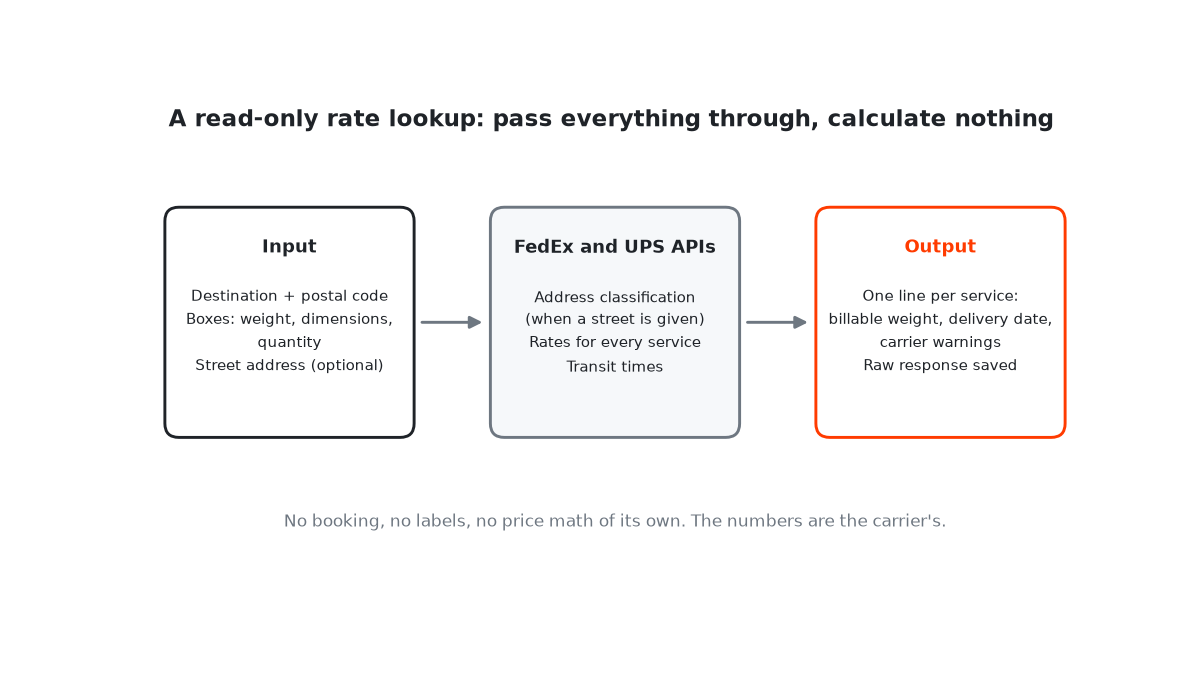
Input goes to the carriers as it is; what comes back is printed as it is.
What It Does
My order tool already compares services for a specific order. This lookup is for quick what-if checks: a different box size, another destination, a later ship date. You give it a destination and the boxes, and it returns the carrier’s answer:
Input: the destination country and postal code, plus each box as weight, dimensions, and quantity. A street address is optional.
Output: one line per service with the billable weight, the estimated delivery date, and any warning the carrier attached. A --full flag prints the carrier’s complete breakdown.
Audit trail: every request, with the account number masked, and every raw response is saved, so I can check later exactly what the carrier said.
Read-only by design: it never books a shipment or creates a label.
A typical call, for two 20kg boxes going to the U.S., looks like this:
fedex-rate --to US --postal <postal-code> --box '20:40x30x30*2'
A twin command does the same for UPS with the same arguments, and I usually run both side by side. (The quotes around the box spec matter. Without them, my shell tried to expand the * as a filename pattern and the command failed.)
The Rule That Shaped It: Pass Everything Through
The most important decision wasn’t technical. I wanted the carrier’s own numbers, not my estimate of them. So the tool sends my inputs to the carrier as they are and prints what comes back. It doesn’t do its own price math, doesn’t drop or re-sort services, and doesn’t calculate volumetric weight itself. The billable weight it shows is the carrier’s.
That sounds like a limitation. In practice it’s the point. A homemade calculation is a second source of truth, and second sources drift. When a number looks wrong, I want to know it’s the carrier’s number, and the saved raw response lets me check.
Three Things the Carrier APIs Taught Me
1. Residential is the carrier’s call
Whether a delivery counts as residential changes the price, and it isn’t something you decide. When I pass a street address, the tool asks the carrier how it classifies the destination (FedEx’s address validation, or UPS’s address classification, which covers U.S. and Puerto Rico addresses) and sends that along with the rate request. Without a street address, no residential flag is sent, so the quote leaves out any residential surcharge. I treat address-less quotes as incomplete for that reason.
2. UPS wants the account and the shipper in the same country
UPS’s rating API returns error 111617 when the country on the account and the country of the shipper don’t match. It’s a small rule, but it’s the kind you only find by running into it.
3. Delivery dates are a separate question
FedEx returns delivery dates from its transit-times service, not in the rate response, so the tool makes a second call for them. A flag skips it when I only need the price.
One more detail: carriers attach routine notices to every service in every response. The tool hides those in the short view and keeps them in the full output and the raw logs, so the warnings that matter stand out.
What Building It With an AI Assistant Looked Like
I built it in Claude Code, Anthropic’s coding assistant, on my own server. The first working versions of the FedEx and UPS commands both came together on the afternoon of September 15, 2026, and I finished refining them the next day. Over that stretch the FedEx script went through 29 rounds of edits and the UPS one 15.
The split of work was clear. I set the rules: read-only, pass everything through, save the raw responses, hide routine noise. The assistant wrote the code that follows them, about 650 lines of Python using only the standard library.
Should You Build One?
If you check rates a few times a month, the carriers’ websites are fine. If you do it several times a week, a small tool starts to make sense, and both FedEx and UPS run developer programs with rating APIs.
If you do build one, the three rules above are the part I’d copy. Keep it read-only, so checking a rate is never one click away from booking. Print the carrier’s number instead of calculating your own. And save the raw request and response, because that’s the only way to settle whether a surprising number came from the carrier or from your inputs.
I sell to overseas buyers from Korea and handle the shipping side on my own. A lot of that work is checking things: comparing rates, reading shipment details, waiting on support replies, remembering to look at a review again. An AI browser agent now does most of that checking. Here’s how the setup works, the rule I treat as the most important, and the line the agent never crosses.
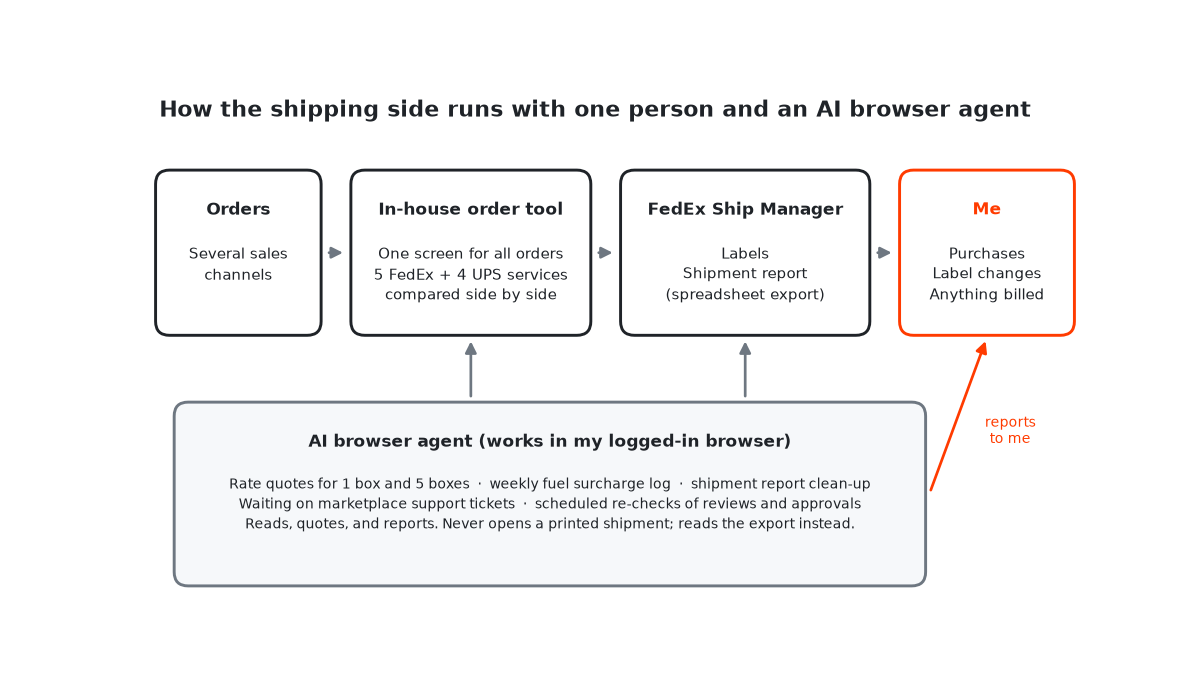
How the jobs are split between the tools, the agent, and me.
The Setup
Almost every overseas order goes out with FedEx International Priority, and my standard packing unit is a 22kg box. Three tools carry the work:
An in-house order tool. It pulls orders from several sales channels into one screen and compares five FedEx services and four UPS services side by side for a shipment.
FedEx Ship Manager. Labels are created here, and its downloadable shipment report is my source of truth for what was shipped.
An AI browser agent. It works inside my logged-in browser, so it can use the same sites I do without separate integrations.
None of these is exotic. What makes the setup work is how the jobs are split between them, and between the agent and me.
Every Rate Check Covers Two Scenarios
When I check a rate, I never ask for one number. I ask for two: one box and five boxes (110kg). Seeing both side by side answers the question I actually have, which is whether to ship now or wait for more orders.
The other check is volumetric weight. A 43×30×25cm box has a volumetric weight of 6.45kg (length × width × height ÷ 5,000), so a full 22kg box is billed on its actual weight. Move to a noticeably bigger box and that can flip, and the quote changes with it. Box size is part of the price, not an afterthought.
What the Agent Does Each Week
Rate checks for the one-box and five-box scenarios.
Shipment report clean-up, turning the exported report into the summary I need.
Waiting on support tickets. When I have an open ticket with a marketplace, the agent checks it on a schedule. If nothing has changed, it reports one word: “pending.” When an answer arrives, it summarizes the full reply.
Scheduled re-checks. After I submit something for review, it schedules a follow-up check instead of me remembering to look.
Each of these is a reading or comparing job with a clear output. That’s deliberate.
The Rule That Matters Most: Read the Export, Never Open the Record
One mistake in this setup is both easy to make and hard to undo. In FedEx Ship Manager, opening a shipment that has already been printed with “view” can put you into an edit flow, and that flow can cancel the label and issue a new tracking number.
So the agent never opens shipments. It reads the shipment report instead, which you can download as a spreadsheet from the shipment list. As a bonus, the estimated cost in that report matches the online rate tool for the same weight and dimensions, so it doubles as a check that a rate was looked up with the right inputs.
The broader lesson: if a job only needs information, give the automation a read-only source, even when the live screen is more convenient.
What the Agent Never Does
My order tool has a “process order” button. After one confirmation dialog, it buys stock and charges my card immediately. That button is the reason for my two firmest rules:
Checking and doing are separate. The tool keeps the check and the action on separate buttons, and when the agent inspects orders it cancels that confirmation dialog every time.
Money and labels stay with me. The agent reads, quotes, and reports. Purchases, label changes, and anything that changes what I’m billed take a human click.
It’s a small amount of friction, and it’s the part of the setup I would keep if I had to drop everything else.
If You Want to Build Something Similar
You don’t need my tools to copy the pattern. Here’s where I’d start:
Pick one repetitive check where a wrong answer is cheap to catch. Rate comparisons are a good first job.
Give the agent read-only sources wherever they exist. Exports, reports, and published pages come before live records.
Write down what “done” means. “Reported the reply” is a better instruction than “checked the inbox.”
Log what nobody else keeps. If a number only exists for the current week, start recording it now.
Keep one human click in front of anything that spends money.
The agent hasn’t replaced judgment in my business. It has replaced a lot of looking, and that turned out to be the part worth automating.
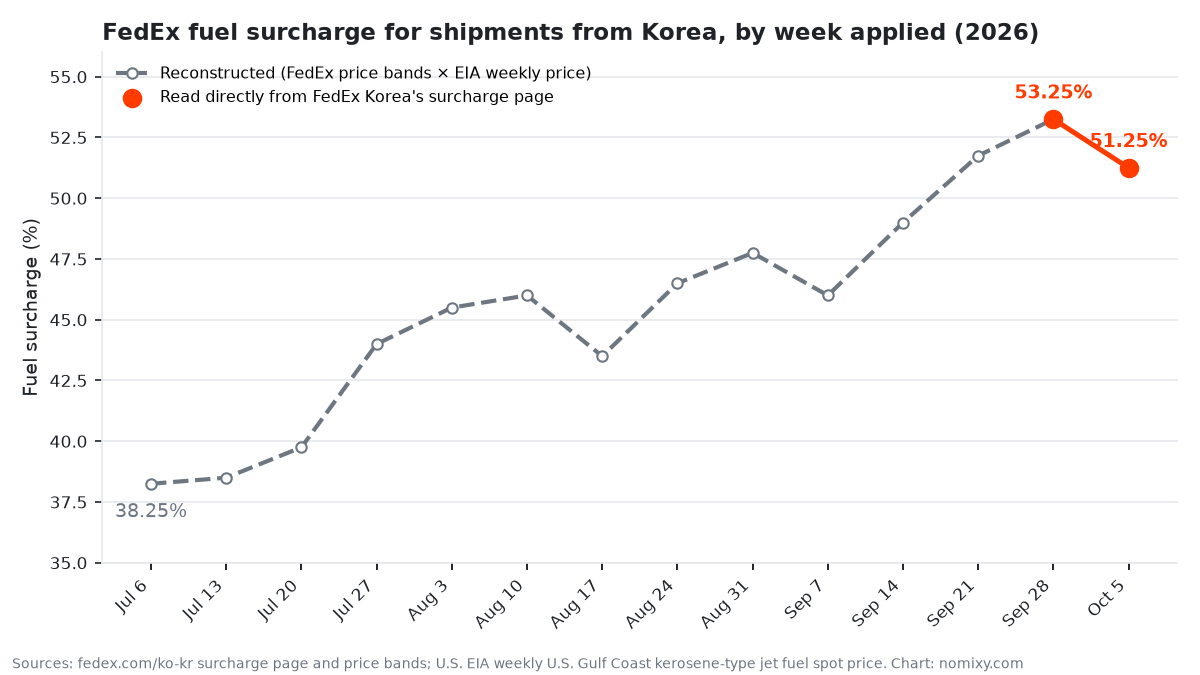
If you ship internationally from Korea with FedEx, one line on the invoice changes every Monday: the fuel surcharge. For the week of September 28, 2026 it was 53.25%. For the week of October 5, FedEx posted 51.25%. In early July, by my reconstruction, it was 38.25%.
FedEx Korea’s surcharge page only shows the current week, so there is no official history to look back on. I rebuilt the past quarter from public data, checked the method against the live page, and now log the number every week. Below is the data, how FedEx sets the rate, and how to work out next week’s rate yourself.
Weekly FedEx fuel surcharge for shipments from Korea. Grey: reconstructed. Orange: read directly from FedEx Korea’s page.
Why I Started Tracking It
Every shipment I send abroad goes out with FedEx, so the surcharge goes straight into what each one costs. When I wanted to see how it had moved over the summer, I found that FedEx Korea’s surcharge page shows a single row: the current week, its fuel price, and its rate. There’s no archive and no link to past weeks.
So I did two things. I rebuilt the past weeks from data that is public, and I had my AI browser agent start recording the official rate every Monday. The first gives me a quarter of history. The second means I never have to rebuild it again.
The Data: 14 Weeks, July 6 to October 5, 2026
The table shows each week the rate applied, the U.S. Gulf Coast jet fuel price it was based on, and where each number comes from. I read the last two rows directly from FedEx’s page. The rest are reconstructed, using the method described below.
Week applied
USGC jet fuel ($/gal)
EIA week ending
Surcharge
Change (pts)
Source
Jul 6
2.788
Jun 26
38.25%
—
Reconstructed
Jul 13
2.816
Jul 3
38.50%
+0.25
Reconstructed
Jul 20
2.971
Jul 10
39.75%
+1.25
Reconstructed
Jul 27
3.497
Jul 17
44.00%
+4.25
Reconstructed
Aug 3
3.676
Jul 24
45.50%
+1.50
Reconstructed
Aug 10
3.736
Jul 31
46.00%
+0.50
Reconstructed
Aug 17
3.431
Aug 7
43.50%
−2.50
Reconstructed
Aug 24
3.770
Aug 14
46.50%
+3.00
Reconstructed
Aug 31
3.922
Aug 21
47.75%
+1.25
Reconstructed
Sep 7
3.715
Aug 28
46.00%
−1.75
Reconstructed
Sep 14
4.082
Sep 4
49.00%
+3.00
Reconstructed
Sep 21
4.418
Sep 11
51.75%
+2.75
Reconstructed
Sep 28
4.584
Sep 18
53.25%
+1.50
FedEx page
Oct 5
4.351
Sep 25
51.25%
−2.00
FedEx page
Between the weeks of July 6 and September 28, twelve weeks, the rate rose 15 percentage points, from 38.25% to 53.25%, before easing to 51.25% in October. It wasn’t a smooth climb. The rate fell 2.5 points in the week of August 17 and 1.75 points in the week of September 7, and both times it jumped 3 points the following week.
How FedEx Sets the Number
The mechanics are all on FedEx’s own page. They just aren’t spelled out in one place:
Price bands map it to a percentage. FedEx Korea publishes a table of price bands. Each $0.03-per-gallon band moves the surcharge by 0.25 points. For example, $4.34–$4.37 is 51.25% and $4.58–$4.61 is 53.25%.
It changes every Monday. The new rate applies from Monday and shows up on FedEx invoices.
There’s a lag. FedEx notes that the rate can trail the fuel index by about two weeks. In practice, every week in my table uses the EIA price for the week ending on the Friday about ten days before the Monday it applies.
It applies to almost everything. All FedEx services except International Express Freight (IXF) and International Airport-to-Airport (ATA), which have their own rates. It’s added to the net freight charge and to certain other surcharges, such as residential delivery and address correction.
Checking the Method Against FedEx’s Own Number
A reconstruction is only useful if it reproduces what FedEx actually publishes, so I checked it on the newest week. EIA’s price for the week ending September 25 was $4.351 a gallon. That falls in FedEx’s $4.34–$4.37 band, which maps to 51.25%. I worked that out first, then opened FedEx Korea’s page on October 1: the rate posted for October 5–11 was $4.351 and 51.25%.
One match isn’t proof, and FedEx can change its band table at any time. But it’s good evidence that the method works, and it means the surcharge is predictable: once EIA publishes the weekly price, you can work out the rate it leads to yourself.
What a 15-Point Swing Means If You Sell Internationally
I’m not going to share my own rates, but the surcharge math doesn’t need them. On the same net freight charge, the freight-plus-fuel total at 53.25% is about 11% higher than at 38.25% (1.5325 ÷ 1.3825 ≈ 1.11). The October drop to 51.25% takes about 1.3% back off that total.
For a small seller, that’s enough to matter:
Put a date on every shipping estimate. A number without a week attached can be wrong by the time the box ships.
Review fixed shipping prices on a schedule. If you charge customers a flat international shipping fee, a quarter like this one can quietly eat into what you keep from each order.
Watch the direction, not just the level. Because the rate follows a public price with a lag, you can see a move coming about a week before it lands.
Method and Limits
Two rows are observed, twelve are reconstructed. I read 53.25% (week of September 28) and 51.25% (week of October 5) directly from FedEx Korea’s page. The other twelve weeks apply FedEx’s current price-band table to EIA’s weekly prices.
The band table could have changed. The reconstruction assumes FedEx used the same table all quarter. If it changed, the older rows could be off. Where a price sits exactly on a band edge (the week of August 24), I used the band that starts at that price, since FedEx’s table lists the minimum of each band.
This isn’t FedEx data. It’s my own record, built from FedEx’s public page and EIA’s public series. For billing questions, FedEx’s page and your invoice are the source of truth.
No contract rates here. The surcharge is a public percentage. Account-specific rates aren’t part of this.
Most solopreneurs do not have a “which AI tool is best” problem. They have a timing problem — they pay for premium tiers long before their workflow actually needs them, and the subscriptions quietly eat into thin margins. The honest answer to the free vs paid AI tools question is not “go free” or “go paid.” It is about when. A large share of solo operators can run on free tiers well past their first few thousand dollars in monthly revenue before paid upgrades make a measurable difference. This guide lays out exactly when to stay free, when to upgrade, and how to keep your AI budget proportional to what the business can support — with real current pricing and a simple framework instead of a spending horror story.
Smart AI budgeting is not about spending more — it is about spending at the right time.
Free tiers cover most early workflows — ChatGPT, Claude, Canva, and Zapier free plans handle a lot until your volume grows.
Upgrade on signals, not impulse — repeated rate-limit hits, maxed automations, or quality problems costing you clients.
The 2% rule — keep total AI tool spend under about 2% of monthly net revenue to protect margins.
Upgrade one tool at a time and give each 30 days before adding the next, so you can measure what works.
You can launch a viable solo business on $0 in AI subscriptions in 2026.
Why Free AI Tiers Are Often Enough at First
The free vs paid calculation in 2026 looks nothing like it did in 2024. Back then, free tiers were essentially demos: a handful of messages, then a paywall. That has shifted. Today, ChatGPT’s free plan gives capable model access with daily limits, Claude’s free tier handles email drafting and research summaries well, Canva’s free tier includes a large template library and AI image generation, and Zapier’s free plan covers basic automations.
Why did free tiers get so good? Competition. With so many capable AI tools fighting for users, the free tier has become the primary customer-acquisition channel. The companies want you comfortable and dependent before you ever consider a paid upgrade — which works in your favor as long as you stay disciplined about it.
Free AI tools in 2026 include features that were premium-only just two years ago.
For a solo business in its early stages, free tiers cover a large share of day-to-day work: drafting emails, generating social captions, creating basic graphics, building simple automations, and managing a CRM pipeline. The gap between free and paid is no longer mainly about quality — it is about volume and speed. If you write a couple of posts a week and manage a handful of clients, free tools do the job. If you write ten posts a week and manage fifty clients, paid tiers start saving real hours. Knowing where you sit is the whole decision.
A Free Stack That Covers the Basics
If you want a starting point, these free pairings cover most day-to-day work in a small business. Each pair splits the job so one tool’s limits are covered by the other.
Job
Free pairing
Why the pair works
Writing and research notes
Claude Free + Google NotebookLM
Claude drafts long-form well; NotebookLM answers only from the sources you upload
Graphics
Canva Free + Microsoft Designer
Canva for layouts and resizing, Designer for one-off AI images
Automation
Zapier Free + Make Free
Zapier for simple one-step flows, Make for multi-step or conditional ones
Research
Perplexity + ChatGPT Free
Perplexity finds sourced, current information; ChatGPT helps you analyze it
Customer chat
Tawk.to + Tidio Free
Tawk.to for live chat, Tidio’s free bot trained on your own FAQ
Books and projects
Wave + Notion Free
Wave for invoices and expenses, Notion for content calendars, clients, and SOPs
Free tiers change often, so check the current limits before you build a routine around one.
Free vs Paid: Feature-by-Feature
Abstract advice does not help you decide. Here is a concrete comparison of the tools most solopreneurs actually use, with the features that matter at each tier and a clear upgrade trigger. Prices are entry-tier rates at the time of writing; always confirm current pricing on each tool’s own page.
Tool
Free Tier
Paid Tier
Price/Month
Upgrade When…
ChatGPT
Capable model, daily limits, basic image gen
Higher message caps, advanced models, custom GPTs
~$20
You hit daily limits 3+ times/week
Claude
Strong model access, standard context
Higher usage, more context, Projects
~$20
Long docs or deep research needed daily
Canva
Large template library, basic AI tools
Background remover, brand kits, more storage
~$13
Brand consistency matters for client work
Zapier
100 tasks/month, single-step Zaps
750 tasks/month, multi-step, filters, paths
~$20
You need multi-step automations or 100+ tasks
HubSpot CRM
Contact management, deal pipeline, email tracking
Sequences, automation, custom reports
paid tier
You manage 50+ active leads/month
Notion
Generous free workspace, limited AI
Expanded AI, database automations
~$10
AI-assisted writing is a daily habit
Free vs paid AI tools — the features that actually matter for solopreneurs.
Every tool on that list has a genuinely useful free tier. You can run outreach with HubSpot free, design with Canva free, draft with ChatGPT or Claude free, and automate a few workflows with Zapier free. The paid tiers do not unlock magic — they unlock scale: more messages, more automations, more storage. If you are not at a scale where those limits pinch, you are paying for comfort, not capability.
5 Signals That You Need to Upgrade
So when should you actually pull the trigger? Not when a creator tells you to, and not when you see a discount. When your own workflow sends clear signals.
Signal 1: You hit rate limits consistently. Once or twice a week is normal. Three or more times means you are losing productive time waiting for resets, and at that point a ~$20/month plan pays for itself in recovered hours alone.
Subscriptions add up fast — know your upgrade signals before committing.
Signal 2: Your automations are maxed out. Zapier’s free tier caps you at 100 tasks per month. When your order confirmations, lead notifications, and invoice reminders start competing for those 100 tasks, the Starter plan (around $20/month for 750 tasks and multi-step Zaps) becomes worth it.
Signal 3: Quality issues are costing you clients. This is the big one. If free-tier output needs so much editing that you would be faster doing it manually — or a client notices sloppy work — that is a revenue problem disguised as a tool problem. Paid tiers typically offer better models, longer context, and more consistent output.
Signal 4: You are cobbling together workarounds. Using three free tools to do what one paid tool handles — exporting, editing elsewhere, re-uploading — is a tax on your time, and your time has a dollar value.
Signal 5: Your revenue supports it. Which leads to the framework that keeps all of this proportional.
The 2% Rule: A Simple Budget Framework
A practical guardrail: keep your total AI spend under about 2% of monthly net revenue — net, meaning after direct costs, not gross. It is a rule of thumb rather than a law, but it reliably prevents the slow creep of subscriptions that outpaces what the business can support. Here is roughly what that looks like:
Monthly Net Revenue
AI Budget (~2%)
Sensible Stack
$0 – $2,000
$0 – $40/month
Free tiers. Few or no paid subscriptions.
$2,000 – $5,000
$40 – $100/month
One paid AI (ChatGPT or Claude) + Zapier Starter
$5,000 – $20,000
$100 – $200/month
Primary AI + Canva Pro + automation tool
$20,000+
$200 – $400/month
Full lean stack with API access where it earns its place
The 2% rule keeps your AI budget proportional to what the business can sustain.
The point of the table is not the exact figures — it is the discipline. Each upgrade should happen only when a specific signal from the list above tells you it is time, not because a new tool went viral. Subscribe in response to a bottleneck, not in anticipation of one.
A Free Tier That Covers a One-Person Shipper
Free tiers are often enough even outside AI. For shipment tracking I looked at FedEx’s two options. The paid “Advanced Integrated Visibility” pushes updates by webhook and is billed per tracking number each month. The free “Basic Integrated Visibility” lets you query up to 100,000 times a day. For a one-person shipper that is far more than needed, which makes the free tier the obvious choice.
Two things I didn’t expect: the tracking API is a separate project from FedEx’s ship and rate APIs, so my existing keys returned a 403 until I created a new project; and there’s no call that lists all of an account’s shipments. You need the tracking numbers. That’s a design constraint, not a reason to pay.
When Paid AI Tools Actually Pay Off
“ROI” gets thrown around without anyone showing the math, so here is the simple version. The fastest payback comes from tools that either automate repetitive work or sharply speed up content production. If a writing tool cuts an article from four hours to under two, and you produce several pieces a month, the time saved easily exceeds a $20 subscription — often within the first month. Automation tools pay off similarly fast once you are past the free task cap.
Real ROI means tracking hours saved, not features gained.
Not every upgrade returns that fast. Design tools like Canva Pro often take longer to show clear value — typically once you have built out reusable brand kits and templates so the time savings compound. The general pattern looks like this:
Weeks 1-2: Learning curve. The paid version may not feel worth it yet. Push through.
Months 1-2: Workflows stabilize as you build habits around the premium features.
Months 2-3: Positive return. Time savings start to clearly exceed the subscription cost.
Months 6-12: Full payback. Saved time, better output, and smoother operations compound.
The biggest mistake is subscribing to four tools at once and never mastering any of them. Upgrade one at a time, give each about 30 days, and measure what actually moves the needle versus what just drains the budget.
The Common Over-Subscription Trap
The pattern repeats across solo businesses: someone sees a viral post about a new AI tool, subscribes immediately, and forgets it exists two weeks later because their existing stack already handled the job. Repeat that impulse a few times a year and you have a stack of half-used subscriptions — money that could have funded ad spend, inventory, or anything that actually generates a return. It is also common to subscribe to two tools that do nearly the same thing, like two general writing assistants, when one would cover both jobs.
A quick filter before any upgrade: “Did I hit a wall with my free tool three or more times this week?” If no, close the pricing page. If yes, check whether the paid tier fixes that specific bottleneck — not whether it adds appealing extra features. That distinction alone prevents most wasted spend. And when you do upgrade, start monthly rather than annual; annual plans save a little but lock you in before you know whether the tool sticks.
Start Free, Upgrade Smart, Stay Lean
The free vs paid AI tools debate has a simple answer in 2026: start with everything free and let your business tell you when to upgrade — not a marketing email, not a comparison chart, but your actual workflow bumping against real limits.
Remember the framework: free tiers in the early stage, one or two targeted upgrades as you grow, a full lean stack once revenue supports it, the 2% rule as your guardrail, and upgrade signals as your trigger. The best AI tool is the one your business actually needs right now — the one that removes a real bottleneck — not the one with the flashiest demo. Bookmark this and revisit it the next time you are tempted to subscribe to something new.
“Fully autonomous AI business” is one of the most over-promised phrases on the internet right now. Strip away the income screenshots and the model underneath is real and worth understanding: a one-person company where AI agents handle the repetitive operations — intake, delivery, invoicing, reporting — while the founder focuses on the work that genuinely needs a human. This is an honest, analytical playbook for that model: how it actually works, what the credible numbers look like, the concrete steps to build one, and exactly where it breaks down.
This guide is direct about what’s achievable and what’s marketing. You’ll find verifiable figures, sourced ranges, and the failure modes most “90-day” success stories conveniently leave out.
The autonomous AI business model lets solo founders operate with minimal overhead — within real limits.
Forget “passive income” and “set it and forget it.” A fully autonomous AI business isn’t passive. It’s a business where AI agents run the repetitive operations — customer intake, content delivery, invoicing, reporting, scheduling — while you focus on the share of work that requires human judgment: strategy, relationship building, and quality control.
The cleanest mental model is being the operator of a company whose execution layer is staffed by software. You still make the decisions and design the workflows, but the routine execution runs without you touching it for stretches at a time. In a typical setup — say, automation consulting for small e-commerce brands — an intake form feeds an agent that analyzes the prospect’s workflow, drafts a proposal, and queues a short human review; after you approve, the agent handles follow-ups, payment through a processor like Stripe, and onboarding. The founder’s time concentrates on judgment, not data entry.
Why this is suddenly viable: the unit economics changed. When the marginal cost of delivering one more unit of a digital service approaches the cost of AI compute, each additional client is close to pure margin. That’s the structural shift behind the model — not a productivity hack, but a different cost curve.
The Real Numbers: What the Data Actually Shows
Honest ranges beat invented screenshots. The figures below are all sourced.
Anyone can post a fabricated revenue table. What’s more useful is the verifiable picture. Fortune’s May 2026 reporting found that solo founders are using AI agents and coding tools to automate workflows that once required dedicated hires — replacing both the labor and some of the expertise those roles carried. The shift is structural: a growing share of new ventures are launching solo, with founders choosing AI tokens over headcount.
The most-cited outlier is real and worth understanding precisely, because it’s usually exaggerated. Maor Shlomo built Base44, an AI app builder, as a solo founder and sold it to Wix for $80 million in cash — roughly six months after founding it, with fewer than ten employees and no outside funding. Per TechCrunch, the company had grown to about 250,000 users and was generating roughly $189,000 in monthly profit at acquisition. That’s a genuine, documented win — and it is the exception, not the template. For every Base44 there are thousands of quiet experiments that never reach meaningful revenue.
The honest planning numbers most solo operators should anchor on:
Stack cost: a functional automation stack runs roughly $300–$500/month (AI tools, an automation platform, payments, hosting). For lighter operations, far less.
Where AI is capable: it’s no longer hype that agents handle a large share of routine work. Salesforce reduced its support headcount substantially after AI agents began handling around half of customer interactions, per Fortune — a useful proxy for how much repetitive work a well-built agent can absorb.
Time, not just money:McKinsey estimates knowledge workers spend about a fifth of their time — roughly one day a week — searching for and gathering information, exactly the kind of task generative AI can absorb.
Notice what’s missing: a precise “I made $X in 90 days” promise. That’s deliberate. Your results depend on your niche, your existing network, and how much time you invest in setup — variables no case study can transfer to you.
The 6-Step Playbook
Mapping the workflow before building it saves weeks of rework.
Step 1: Pick a niche where AI gives you genuine leverage. The sweet spot is digital services with repeatable deliverables — automation consulting, content repurposing, data analysis, AI-powered support setup. Avoid anything that requires physical delivery, complex compliance, or high-touch enterprise relationships while you’re still learning the model.
Step 2: Map the entire client journey on paper first. Before you touch a tool, draw every step from lead capture to final delivery. For each step, mark whether it can be fully automated, needs human review, or requires full human execution. The ratio tells you whether the model is viable for your niche — if more than half the steps demand a human, automation won’t move the needle much.
Step 3: Build the backbone with three or four tools, not fifteen. A practical stack is a reasoning model (Claude or GPT), an automation platform (Make.com or n8n), a payment processor (Stripe), and a database or workspace (Notion or Airtable). Every additional subscription adds failure points. Resist over-tooling.
Step 4: Test with a few free or discounted clients before charging. The first engagements surface the bugs that would embarrass you with paying clients — intake data that won’t format correctly, deliverables in formats your system doesn’t support. Fix these before money changes hands, and collect testimonials while you’re at it.
Step 5: Price on value delivered, not hours worked. If your service saves a client a meaningful number of hours each month, price against that value. Hourly pricing punishes the efficiency that automation gives you; value pricing rewards it, and it’s where the model’s margins actually come from.
Step 6: Put a human review checkpoint before every client-facing output. This is the step people skip and regret. Every proposal, deliverable, and automated email should get a short human review before it reaches a client. A few minutes of review prevents hours of damage control — which brings us to where this model genuinely fails.
Where AI Automation Breaks Down
Knowing when to keep AI in the loop and when to step in is the real skill.
Too many guides pretend AI can do everything. It can’t. Three failure modes show up consistently.
High-stakes client communication. When a client is frustrated or confused, an automated cheerful reply makes things worse. Route anything emotionally charged to a phone call or a personal message. Automation should never be the front line for an upset customer.
Novel problems without precedent. Agents are excellent at pattern matching and weak at genuinely new situations. A client with a custom system, no documentation, and a non-standard format will defeat your automation, and you’ll solve it by hand. If your niche regularly throws one-off problems, budget for more human hours than the model suggests.
Hallucinated specifics. A model can confidently reference an API feature or capability that doesn’t exist. If that reaches a client unchecked, you pay for it in refunds and reputation. This is the entire reason Step 6 exists. Never ship AI output to a client without reading it.
Legal and compliance gray areas. Anything involving contracts, financial advice, or regulated industries needs a human reviewing every AI output. Industries with complex compliance, physical supply chains, or enterprise sales remain a poor fit for autonomous models.
When the Solo Model Stops Making Sense
A simple metric keeps you honest: track your “AI failure hours” each week — the time spent fixing what automation got wrong or doing tasks it couldn’t handle. When that number consistently exceeds about five hours, you’ve passed the point where staying strictly solo helps. A part-time contractor at, say, 10 hours a week is still a fraction of a full-time hire and preserves most of the model’s cost advantage.
Don’t let “I must stay solo” override the numbers. The whole point of the model is leverage, and a person doing 12 hours of cleanup a week to avoid one hire has lost the leverage entirely. The metric tells you when it’s time; listen to it.
An Honest Take on the Model
The most valuable thing about the autonomous AI business model isn’t a revenue figure — it’s a transferable operating framework. Map a process, automate the repeatable parts, keep a human gate on judgment and client trust, and watch a single metric to know when to bring in help. That framework applies whether you’re running consulting, an e-commerce store, or a content business.
It also isn’t stress-free. You trade employee-management stress for system-reliability stress — when an automation fails at the wrong moment, it’s on you. Both kinds of stress are real; pick the one you handle better. And automate sequentially, not all at once: get one step working and verified for a couple of weeks, then automate the next. Boring, incremental automation outlasts the “build everything in a weekend” story every time.
Frequently Asked Questions
What is an autonomous AI business?
A one-person company that uses AI agents and automation to handle repetitive operations — intake, delivery, invoicing, scheduling, reporting — while the founder focuses on strategy, quality control, and relationships. “Autonomous” refers to the execution layer running without constant input, not to the business running itself.
How much does it cost to set up?
A functional setup commonly runs $300–$500/month covering AI tools, an automation platform, payment processing, and hosting, though a lean operation can start for far less using free tiers. The expensive input is your time during the setup phase, not the subscriptions.
What are the best niches in 2026?
Digital services with repeatable deliverables perform best: automation consulting, content creation and repurposing, data analysis, and automated support setup. Avoid niches that require physical delivery, heavy regulatory compliance, or high-touch enterprise sales until you have more experience with the model.
Can I really make a full-time income this way?
Some founders do, and a documented few have built genuinely large outcomes — but results vary enormously based on niche, network, and execution. Treat the headline success stories as proof the ceiling is high, not as a forecast for your own results. A realistic 90-day testing period before committing full-time is the sensible way to validate the model for your situation.
The autonomous AI business model isn’t a shortcut. It’s a different operating system for building a company, and it rewards discipline, transparency about what AI can and can’t do, and a willingness to fix things when they break. Start with one automated process, test relentlessly, expand carefully — and you’ll build something that scales without scaling your stress.
Want weekly, hype-free breakdowns of AI tools and strategies for solo founders? Subscribe at /subscribe.
Branding is one of the first real expenses a solo founder runs into, and it can be brutal. Full-service agency identity packages routinely run into five figures, and even a freelance brand designer on a marketplace like Upwork can quote several thousand dollars for a basic logo-and-style package. For a bootstrapped one-person business, that is often the difference between launching this quarter and not launching at all.
The good news: as of 2026, a stack of AI design tools can get a solo founder to a genuinely professional brand identity for well under $200, usually in a weekend. The output is not always agency-grade, but for an early-stage business it is frequently good enough to compete. This guide is an honest, tool-by-tool playbook: real pricing, a sensible order to work in, what each tool is genuinely good at, and where AI still falls short and a human designer earns the money.
Branding creates a chicken-and-egg problem for bootstrappers. You need credible branding to win customers, but you often need customers before you can afford credible branding. The usual escape hatch is a generic free template, which leaves your business looking like thousands of others.
The cost is real because design is genuinely skilled work. According to the Forbes Agency Council, small-business branding packages have spanned roughly $5,000 to $50,000 depending on scope and agency. That range exists for a reason: a strong identity is a trust signal, and trust converts. The 2025 Edelman Trust Barometer found that trust has become as important as price and quality in purchase decisions. When you are a single person competing against teams with design departments, a weak visual identity quietly costs you deals.
What changed across 2025 and 2026 is that AI tools collapsed the cost of execution. Generating a clean logo, a coherent palette, and on-brand layouts no longer requires years of training, just a clear brief and a few hours of iteration. The strategy still has to come from you, but the production line is now nearly free.
5 Free or Low-Cost AI Design Tools That Replace Expensive Branding Work
These five tools map to the five components of a basic brand identity: color, logo and brand assets, custom imagery, marketing layouts, and a website mockup. All pricing below is current for 2026 and linked to each tool’s official page so you can verify before you spend.
1. Coolors — Brand Color Palettes (Free)
Color is where most DIY brands go wrong, and it is the cheapest thing to get right. Coolors generates harmonious palettes instantly: hit the spacebar to cycle options, lock the colors you like, and it fills in the rest. It also extracts palettes from images and includes an accessibility/contrast preview, which matters more than people think.
Cost: Free for unlimited palette generation; Pro is around $3/month for ad removal and larger palettes. Best for: Choosing 2–4 brand colors before you touch anything else. Why start here: Locking your palette first makes every later step faster and more consistent.
2. Looka — AI Logo and Brand Kit
Looka takes your business name and style preferences and generates dozens of logo directions. Its real value is the brand kit: once you pick a logo, it auto-produces matching business cards, social headers, and email signatures, so your assets stay coherent without manual rework.
Cost (verified on Looka’s pricing page): Free to design; a Basic logo file is a $20 one-time fee, the Premium logo package (full vector files, unlimited edits) is $65 one-time, and the Brand Kit subscription is $96/year. Best for: Logos plus a consistent first set of brand assets. Watch for: Buy the Premium tier if you ever want to scale or print — the Basic PNG-only file will limit you fast.
3. Midjourney — Custom Visuals That Don’t Look Like Stock
Stock photography reads as generic. Midjourney generates original imagery tuned to your brand’s aesthetic — hero images, blog illustrations, concept mockups. The trade-off is a real prompting learning curve, and output needs review before you publish it.
Cost (per Midjourney’s plan comparison): Basic plan is $10/month (about $96/year annually). Best for: Distinctive imagery when stock photos undercut your positioning. Alternative: If you want a free option, Canva’s built-in image generation covers basic needs without a separate subscription.
4. Canva — Layouts, Templates, and Daily Design
Canva is the workhorse. Its AI features generate full layouts from a text description, remove backgrounds, and apply a saved Brand Kit so every asset stays on-brand. For social graphics, presentations, and marketing material, it handles the bulk of day-to-day design.
Cost (see Canva’s pricing): A capable free tier exists; Pro runs around $15/month and unlocks the Brand Kit, premium assets, and background removal. Best for: Social templates, ads, and recurring marketing assets. Why it matters: Consistency at volume — one saved Brand Kit keeps everything aligned.
5. Figma — Website and Product Mockups
If you build your own site, Figma turns a blank canvas into a starting layout. Its AI features let you describe a page in plain language and get a usable wireframe to customize, which removes the hardest part: starting.
Cost: Free for individual use, with paid tiers for advanced collaboration (see Figma’s pricing). Best for: Homepage mockups, app prototypes, and a simple design system. Reality check: AI suggestions get you most of the way to a layout, not all the way — expect to refine.
A Weekend Workflow: Blank Page to Brand Kit
Here is the order I actually work in. The sequence matters: strategy first, then color, then logo, then imagery and layouts. Doing it in this order prevents most rework.
Step 1 — Brand brief (no tools). Write one page: who your ideal customer is, what feeling the brand should evoke, and three adjectives you want associated with the business. No AI tool can do this for you, and skipping it is why most AI brands look pretty but say nothing.
Step 2 — Color in Coolors. Generate palettes, lock a primary color that fits your brief, and let the tool suggest complementary tones. Save the hex codes. Check contrast so your text stays readable.
Step 3 — Logo in Looka. Feed it your name, adjectives, and palette. Generate, narrow to two or three finalists, pick one, and export the brand kit. Buy at least the Premium tier so you get vector files.
Step 4 — Imagery in Midjourney or Canva. Prompt a few hero/illustration variations using consistent descriptors (your colors, your mood). Generate more than you need, then cut hard. Review every image for the usual AI tells before keeping it.
Step 5 — Layouts in Canva. Load your logo and palette into a Brand Kit, then generate social, email, and ad templates. Now everything you produce stays consistent automatically.
Step 6 — Website mockup in Figma. Describe your homepage, iterate, and you have a wireframe to build against. The hard part — the blank screen — is gone.
Add it up and the cash cost is small: Coolors and Figma free, Midjourney $10, Canva Pro around $15, and a one-time Looka logo purchase. You can complete a usable brand identity for well under $200 — and have it ready Monday instead of waiting weeks on agency deliverables.
AI Design Tools vs. Hiring a Freelance Designer
AI does not replace human designers outright, and pretending otherwise is dishonest. But for specific use cases, AI already wins on cost and speed. Here is an honest breakdown.
Criteria
AI Design Tools
Freelance Designer
Cost
Under $200
~$3,000–$15,000
Turnaround
Hours to days
2–8 weeks
Iterations
Unlimited, instant
2–3 rounds typical
Originality
Good; occasional overlap
Fully custom
Strategy
You handle it
Often included in premium scope
Print production
Weak (bleed, die-cuts)
Strong
The practical answer is hybrid. Start with AI when you are pre-revenue: get to “professional enough” in days. Once the business earns consistently, pay a designer to refine what AI produced or to handle the work AI is bad at. Physical packaging is the clearest example — bleed areas, die-cuts, and material textures are constraints AI tools still don’t handle well, and that is exactly the kind of bounded, technical job worth hiring a freelancer for.
The other genuine advantage of AI, even if budget is not your constraint, is iteration speed. Testing a dozen logo or layout variations in an hour is something no human revision cycle matches, and for a solo operator wearing every hat, that compounding speed is the real unlock.
Branding Mistakes AI Cannot Fix for You
AI is powerful and also easy to misuse. These are the mistakes that no amount of generation will save you from.
Skipping strategy. Jumping into image prompts before defining audience and positioning produces visuals that look good and communicate nothing. Write the brief first.
Chasing trends. AI defaults to whatever is common in its training data, which is how thousands of brands ended up with near-identical gradient-and-rounded-sans logos. Pick elements that reflect your specific business, not the current zeitgeist.
Ignoring consistency. AI generates standalone assets beautifully, but keeping them aligned across your site, email, and social takes a simple brand guide you actually reference each time.
Publishing raw output. AI images often have tells — distorted text, odd hands, oversaturated color. Always review and touch up. Canva’s editor handles basics; the free Photopea covers more complex fixes.
Forgetting accessibility. AI color pairings sometimes fail contrast requirements. Run your brand colors through the WebAIM contrast checker before committing.
Frequently Asked Questions
How much does a complete AI design stack cost?
For a full first brand identity you can stay under $200: Coolors and Figma are free, Midjourney Basic is $10/month, Canva Pro is around $15/month, and a Looka logo is a one-time purchase starting at $20 (Premium $65). You only pay for the months you actively design.
Can AI design tools really replace a professional designer?
Not entirely. AI excels at fast options, routine assets, and strong first drafts. Strategic positioning, nuanced art direction, and print production still benefit from a human. For most solo founders, AI handles the large majority of needs with occasional human help for specialized work.
Are AI-generated logos legally safe to use commercially?
Generally yes, with caveats. Tools like Canva, Looka, and Midjourney grant commercial usage rights for assets made on their platforms — always confirm each tool’s terms. The murkier area is copyright registration: in many jurisdictions, purely AI-generated work cannot be registered. Modifying and building on the output strengthens your position. Check the official terms for each tool before launch.
What should I build first?
Color, then logo. A locked palette makes the logo and every downstream asset faster and more coherent. Do the one-page brand brief before either, because the tools execute your decisions — they don’t make them.
The branding playing field has genuinely leveled for solo founders. AI will not think for you, but it executes at a price and speed that were impossible a few years ago. Pick one tool from this list, spend a couple of hours this weekend, and see what you can build.
The “AI automation agency” has become one of the most-hyped solo business models of 2026, and most of the content about it is either a screenshot of someone’s revenue or a vague promise that you too can quit your job. This is neither. It is a realistic breakdown of how the model actually works for a one-person operator: what the work is, what it costs to run, how operators find clients, how the pricing math holds together, and where it goes wrong.
If you have basic technical comfort and the patience to learn workflow tools, this is a clear-eyed look at whether the model is worth your time.
The model is one person connecting existing tools — not writing software from scratch — to remove specific operational bottlenecks for small businesses.
The demand is documented. McKinsey’s State of AI 2025 found 88% of organizations now use AI in at least one function, and that workflow redesign has the biggest measurable effect on results.
The cost base is genuinely low. A working stack (Make or n8n, an AI API, Airtable) runs well under $200/month plus usage, which is what makes the margins attractive.
Warm channels beat cold outreach — content, communities, and free audits convert far better than cold email for a one-person operation.
Scope creep is the main failure mode. Without defined deliverables, revision limits, and a setup fee, the model collapses into unpaid maintenance.
What a Solo AI Automation Agency Actually Is
Forget the agency stereotypes — glass offices, account managers, project coordinators. A solo AI automation agency in 2026 is one person who builds, deploys, and maintains AI-powered workflows for small and mid-size businesses. You are not writing code from scratch. You are connecting existing AI APIs and no-code automation platforms to solve specific, repetitive operational problems.
A representative project: a real estate brokerage wants incoming email leads automatically scored, enriched with property data, and routed to the right agent, with a personalized follow-up sent within minutes. A few years ago that needed a CRM admin, a marketing automation specialist, and a data engineer. A solo operator now assembles it in a tool like Make with AI API calls and an Airtable backend in well under a day.
The clients paying for this are usually not tech companies. They are law firms, dental practices, e-commerce brands, and logistics operators who know AI can help but have no internal capacity to build it. That gap between awareness and implementation is where the model lives — and the data suggests the gap is wide.
5 Automation Models That Pay (and What Each Solves)
Before the market and economics, it helps to see concretely what a solo agency actually sells. Five models recur because each solves a specific, measurable pain point, can be delivered in days rather than weeks, and commands premium pricing because the return is immediate.
Model
Client Pain Point
Typical Build Time
AI email triage
Inbox overwhelm
3–4 days
Client onboarding automation
Manual, inconsistent follow-ups
4–5 days
AI content pipeline
Content creation bottleneck
5–7 days
CRM + lead scoring
Lost leads, no follow-up
5–7 days
Invoice + payment automation
Late payments, manual billing
3–5 days
Email triage connects the client’s inbox to an AI classification layer that tags messages by urgency, drafts routine replies, and flags anything needing a human — the easiest first sale because the value is obvious in a live demo. Client onboarding creates the project folder, sends the welcome sequence, generates the invoice, schedules the call, and updates the CRM the moment someone signs up; consistency is the selling point as much as time saved. The content pipeline tends to be the highest-value offer, taking a single brief through outline, draft, social posts, and newsletter with a human approval stage before publishing. CRM + lead scoring scores incoming leads on behavior and routes hot ones to the founder immediately — the win is no longer ignoring warm leads they already have. Invoice + payment automation auto-generates invoices on milestones, chases overdue accounts, and reconciles payments; simple to build and close to universally wanted.
The Market: Why the Demand Is Real
The strongest evidence for this model is not an income screenshot — it is the adoption gap in the broader economy. McKinsey’s State of AI 2025 report found that 88% of organizations now use AI in at least one business function, up from 78% a year earlier — but the majority are still experimenting or piloting, and only about a third have begun to scale. Critically, the report identifies the redesign of workflows as the single attribute with the biggest effect on whether an organization sees real financial impact from AI.
That is the whole opportunity in one sentence: businesses are adopting AI but struggling to redesign their actual workflows around it, and smaller companies are furthest behind. McKinsey also found 23% of organizations are already scaling agentic AI systems with another 39% experimenting — meaning demand for people who can wire these systems into day-to-day operations is climbing, not leveling off.
The macro backdrop reinforces it. The 2025/2026 Global Entrepreneurship Monitor report found entrepreneurial activity near record highs in many economies, with US early-stage entrepreneurial activity around 18.5%, while flagging an “AI Readiness Gap” between founders who can deploy AI and those who cannot. A solo automation operator sits squarely on the profitable side of that gap.
The Economics: Realistic Revenue and Cost Ranges
Here is where most agency content gets dishonest, so let me be precise about what is knowable. There is no single “typical” income for a solo AI automation operator — it depends entirely on client count, retainer size, and how productized the service is. What is knowable is the cost structure, because the tools have published prices, and that cost structure is what makes the margins attractive on paper.
The model is high-margin for one reason: the recurring tool cost is low and there are no salaries. A working stack costs well under $200/month plus variable AI usage (detailed in the next section). Revenue, by contrast, is retainer-based — operators typically charge monthly fees per client for building and maintaining their automations. The math that makes the model appealing is the ratio: a handful of retainer clients against a sub-$200 fixed cost base means most of each retainer is gross margin before the operator’s own time.
The honest caveats matter as much as the ratio. First, “margin” ignores the operator’s labor, which is the real constraint — there are only so many clients one person can build for and support. Second, revenue is lumpy: client churn, a single demanding account, or a month spent onboarding can swing income hard. Third, the headline margin figures circulated online usually exclude taxes, the value of unpaid business-development time, and the cost of the inevitable rebuild when a client changes their tools. Treat any “X% margin” claim — including ones you read here — as a gross figure on tool cost alone, not take-home pay.
The defensible takeaway: this is a low-overhead, high-gross-margin service business whose ceiling is set by your time and your ability to productize, not by capital. That is genuinely different from a traditional agency, and it is the part of the hype that holds up.
The Tech Stack (and What It Really Costs)
You do not need an expensive software stack to run this model. Here is a representative one with current, verifiable pricing.
Automation layer: Make or n8n.Make’s pricing in 2026 runs from a free tier up through Core at $9/month and Teams at $29/month (note that Make switched from “operations” to “credits” in 2025, which changes how AI-heavy scenarios are metered). For operators or clients who want self-hosting, n8n’s self-hosted Community Edition is free software with unlimited executions — you pay only for the server — while n8n Cloud starts at $20/month. Zapier is the most beginner-friendly but its task-based pricing climbs faster at volume.
AI layer: a frontier model API. This is the variable cost. The Claude API pricing in 2026 runs roughly $1/$5 per million tokens for Haiku, $3/$15 for Sonnet, and $5/$25 for Opus (input/output), with the Batches API at 50% off and prompt caching cutting cached input cost sharply. A light month might be tens of dollars; a heavy onboarding month can run into the hundreds. Matching a cheaper model to simpler tasks is the main cost lever.
Data and delivery layer.Airtable works well as a per-client operational database and dashboard, so clients can see their data without touching your backend. Notion handles documentation and SOPs, and a screen-recording tool for handoff videos noticeably cuts support questions. Most of these have free or low-cost tiers.
Total recurring cost lands under $200/month excluding variable API usage — a fraction of what a traditional agency spends on project management, design, and CRM licenses. The leanness is structural, not a trick, and it is the real reason the model attracts solo operators.
How Operators Find Their First Clients
Cold email is a poor fit for a one-person agency — the volume needed to make it work competes with the time needed to deliver. The channels that consistently convert for solo operators are warm.
Content that demonstrates, not declares. Posting concrete case studies of automations you have actually built — “here is how I automated my own invoice follow-ups” with a short walkthrough — does the selling for you. It proves capability instead of asserting it, and it gives a prospect a reason to reach out rather than be pitched.
Genuine participation in one community. Joining a single industry-specific Slack or Discord group and answering automation questions in detail — without pitching — builds the trust that turns into work. People hire the person who already helped them. The key is depth in one community over a thin presence in ten.
Free audits. A short, no-charge “automation audit” where you screenshare and identify two or three workflows a business could automate proves competence before any money changes hands. You give the diagnosis free and charge for the implementation. This works because it inverts the usual sales dynamic — the prospect sees value first.
Once a few retainer clients are in place, referrals tend to become the primary growth channel. Retainer relationships compound: a satisfied client who sees their automations running reliably is the most credible salesperson you have.
Pricing and Packaging the Service
Pricing is where operators most often undercharge. A flat “unlimited automations” retainer at a low price is the classic trap — it guarantees scope creep and caps your upside. A tiered structure works better.
A common, defensible structure has three tiers: a starter tier with a small number of core automations and async support; a growth tier with more automations, defined revision rounds, and priority support; and a scale tier with broader scope, dedicated monitoring, and regular strategy calls. Most clients self-select into the middle tier, which is by design — the starter tier exists to make the growth tier feel reasonable. The exact dollar figures should reflect the value delivered in your market, not a number copied from someone else’s screenshot.
Three pricing rules consistently hold up:
Avoid hourly billing. Your value is the outcome, not the time. An automation that takes two hours to build but saves a client many hours every week is worth far more than two hours of your rate. Hourly pricing caps the upside on exactly the work where you add the most value.
Charge a setup fee. A one-time fee for the initial build covers discovery, architecture, testing, and documentation. Without it, you absorb weeks of unpaid onboarding before the retainer ever pays for itself.
Cap revisions. “Unlimited revisions” sounds generous but means you are perpetually rebuilding instead of maintaining. A defined number of revision rounds per cycle keeps scope — and your margin — intact.
Mistakes That Sink Solo AI Agencies
The failure modes are predictable, which means they are avoidable.
Saying yes to everything. Not every business problem is an automation problem. Some clients need a better CRM, not a custom workflow. Learning to say “this is not something I can automate well” and referring them on protects your reputation, which depends on results rather than project count.
Skipping documentation. Every automation needs a one-page spec: what it does, what triggers it, the expected output, and what breaks it. Without documentation, you will forget how your own systems work within a few months — and so will the client if they ever bring it in-house.
Ignoring monitoring. Automations fail silently. An API changes its response format, a scenario hits a rate limit, a client renames a field in their CRM. If you are not monitoring, you learn about the failure from an angry client. Built-in error notifications plus a quick daily log review take minutes and save relationships.
Underpricing to win deals. A cheap client expects the same attention as an expensive one — often more, because they feel they need to extract their money’s worth. Pricing for the value delivered, not for what you imagine a small business can afford, is what keeps the model sustainable.
The through-line on all four is discipline. The model is lean and high-margin, but only if you treat it like a business with defined scope, documented systems, and honest pricing — not as a series of favors.
Custom work has a ceiling; productizing breaks it. After a few builds of the same model, most of the system turns out to be identical across clients — the same scenario structure, the same classification logic, the same notification pattern. Only the rules and templates change. Templatize it, and a build that took twenty hours drops to a handful at the same price. That is the entire economics of productizing: same deliverable, multiplied margin.
Productizing means packaging your best automation into a repeatable offer with fixed scope, fixed price, and fixed delivery time — no discovery calls that drag for weeks, no scope creep. The client gets a system already tested on multiple businesses; you get predictable revenue. A productized offer can live on a single clean landing page: three packages, a booking link, and a checkout. Busy founders do not want a webinar — they want to see prices, read one case study, and book a call. A simple one-pager consistently converts better than an elaborate funnel for this kind of service.
Final Thoughts
The AI automation agency model is real, and the parts of the hype that survive scrutiny are the low overhead, the high gross margins on tool cost, and the documented demand from businesses that have adopted AI but not redesigned their workflows. The parts that do not survive scrutiny are the specific income claims — which is why this playbook deliberately avoids them in favor of verifiable ranges and structure.
If you are evaluating the model, the right move is not to chase someone else’s revenue number. It is to build one automation for your own business, document it, and use it as your first case study. From there the playbook is discipline: clear pricing, defined scope, documented systems, proactive monitoring, and the willingness to say no to work that does not fit. That is the honest version of the model — and it is a good one.
If this breakdown was useful, subscribe to the Nomixy newsletter for weekly, no-hype solo business strategies.
Market research used to be one of the clearest dividing lines between a funded company and a one-person business. A startup could pay an analyst or a research firm to size a market, map competitors, and vet suppliers. A solo founder mostly Googled, opened twenty tabs, and made a gut call. AI deep-research tools have narrowed that gap more than almost any other category of software, and Perplexity’s Deep Research mode is one of the clearest examples.
For a one-person business, research is a constant tax on the week: vetting suppliers, checking regulations across markets, benchmarking prices, and reading enough to make a decision without drowning. This guide is a practical playbook for using Perplexity Deep Research as a solo operator — what it actually does, six workflows worth setting up, where it genuinely falls short, and how to verify what it gives you.
What Perplexity Deep Research Actually Does
Most people know Perplexity as a search engine that cites its sources. Deep Research is a different mode. Instead of pulling a snippet from one or two pages, it performs multi-pass reasoning: it runs several sequential searches, refining the query as it discovers what is missing, reads full articles, cross-references data points across sources, and compiles a structured report with inline citations. Perplexity’s own announcement of Deep Research describes it visiting on the order of a hundred or more pages for a single query, typically finishing in two to five minutes. As of 2026 the mode runs on frontier reasoning models for Pro and Max users, which is part of why the synthesis quality is noticeably higher than a basic search summary.
The practical mental model is a research assistant working at machine speed. You ask a precise question — “which white-label cosmetics manufacturers in Southeast Asia accept minimum orders under 500 units?” — and instead of a list of blue links you get a written brief with comparison tables and source URLs you can check. For a solo founder, the bottleneck usually is not execution; it is knowing what to execute on. Bad information leads to bad bets, and a thirty-minute research session can flag a saturated niche before you sink months into it.
This shift is real enough that Perplexity’s leadership has built a public thesis around it. CEO Aravind Srinivas has repeatedly argued that collapsing the cost of research and operations will fuel a wave of very small businesses. Whether or not his timeline holds, the underlying math is sound: a $20/month subscription now does a large share of the work that previously required a paid specialist or a data subscription.
What a Tool Like This Can Replace (And What It Can’t)
Before listing workflows, it is worth being precise about the substitution, because overstating it is the fastest way to make a bad decision. A solo founder’s typical research stack is some mix of ad-hoc freelance research, a couple of data subscriptions, and a general AI assistant for summaries and brainstorming. Deep Research can absorb a meaningful chunk of that — particularly the public-web intelligence gathering that makes up most day-to-day solo research.
What it does not replace is gated, proprietary data and senior judgment. Trade-specific platforms like Euromonitor or GlobalData, customs databases, and paywalled academic journals sit behind logins no web tool can crawl. And a senior analyst brings relationship context and proprietary data that a public-web tool cannot. The honest framing: for roughly the bulk of the routine research a one-person business faces, Deep Research is a strong substitute; for the specialized remainder, you still pay for access or expertise. Budgeting around that split — keep the one or two data sources you truly need, drop the rest — is the realistic version of “it replaced my research stack.”
6 Deep Research Workflows for Solo Founders
These are six concrete, repeatable workflows. Each one tends to compress a task that used to eat half a day into something closer to ten or twenty minutes.
1. Competitor landscape snapshots
Ask it to map direct competitors in a specific sub-niche — pricing tiers, founding year, estimated size, recent product moves — and request the output as a comparison table you can paste into your notes. The structured-table format is where Deep Research shines, and it turns a multi-day analyst task into a single prompt you refine.
2. Supplier due diligence
Feed it a manufacturer or supplier name and ask for certifications, recall or complaint history, reviews across marketplaces, and any regulatory flags. It often surfaces trade databases and forum threads you would not find by hand. Critically, treat anything it finds about regulatory status as a lead to verify against the official source, not a final answer — which is exactly where the citation links earn their keep.
3. Content gap analysis
Before writing an article, ask: “What questions about [topic] are answered poorly by the current top-ranking pages?” The tool reads the top results and identifies gaps, which is essentially a free content brief. This is one of the most reliable uses because the source material (public web pages) is exactly what the tool is built to read.
4. Pricing benchmarks across regions
For a new product, ask for retail and wholesale price ranges for comparable products by region. It pulls from marketplace listings and brand sites and organizes by geography in minutes. Note the limitation up front: prices it returns reflect whatever was last indexed, so use it for ballpark positioning, not the exact number you list at.
5. Regulatory and compliance scans
For cross-border sellers, ask it to pull recent regulatory updates for a target country — ingredient rules, labeling requirements, import duties — and compare them against your product. The output usually links to official government sources. Always click through and confirm the critical ones manually; compliance is the worst place to trust an unverified summary.
6. Partnership and outreach prep
Before pitching a distributor or collaborator, run a query on their company: recent press, leadership changes, public complaints, and stated priorities. You walk into the conversation with a one-page brief instead of a blank page, which measurably improves how prepared you sound.
Turning Research Into Shareable Reports
One underused feature is Perplexity Pages, which converts a research thread — citations and tables included — into a clean, hosted, shareable document. For a solo operator this collapses two steps into one: you get the research and a presentable deliverable in the same place, without copy-pasting into a doc and reformatting citations. Three practical uses: sending a prospective partner a cited market brief instead of building a slide deck; drafting blog outlines from a research thread; and keeping a lightweight decision log so you can revisit the reasoning behind a past call.
A Lightweight Daily Research Routine
A tool is only as useful as the habit around it. A simple morning routine keeps research from sprawling across the whole day:
Industry pulse check. One query: “What happened in [my niche] in the last 24-48 hours?” This replaces scrolling several newsletters and feeds.
Weekly competitor monitor. Once a week, run a query on your top competitors to catch launches, pricing changes, or hiring signals.
Decision queue. Phrase any pending decision as a research question and let it run while you do something else. You return to a cited answer instead of a blank tab.
One tip that disproportionately improves output: be specific. “Tell me about the skincare market” returns a generic overview. “Compare the US and Korean sunscreen markets by approximate revenue, top brands, and key regulatory differences” returns something you can act on. Deep Research rewards precise prompts.
Real Limitations Worth Knowing
No AI research tool solves everything, and pretending otherwise leads to expensive mistakes. The honest blind spots:
Paywalled journals. Answers behind Springer or Elsevier paywalls are inaccessible. For peer-reviewed scientific data you still need library or institutional access.
Live pricing. Marketplace prices change daily; the tool returns whatever was last indexed, which can be days or weeks old. Verify time-sensitive numbers manually.
Proprietary databases. Euromonitor, GlobalData, customs platforms, and similar gated sources require paid logins no crawler can reach.
Occasional misattribution. Like all LLM-based tools, it can attribute a statistic to a source that does not quite contain it. The fix is simple and non-negotiable: click through and verify any number that will drive a financial decision, proposal, or published claim.
Very recent events. Indexing is fast but not instant, so breaking news may be thin until sources publish detailed coverage.
These are blind spots, not deal-breakers. For the public-web intelligence that makes up most of a solo founder’s research workload, Deep Research handles the job — as long as you know where its output ends and your verification begins.
One limitation is easy to forget: research tools can’t find data that was never published. I wanted a history of FedEx’s fuel surcharge for shipments from Korea, but FedEx Korea’s surcharge page only shows the current week and keeps no archive. No amount of deep research recovers that. I ended up reconstructing past weeks from the rate bands FedEx publishes on that page and the U.S. EIA’s public weekly jet fuel prices (the result). Sometimes the best research workflow is starting your own dataset.
How It Changes the Way You Decide
The most useful effect is not the time saved on any single task; it is the lowered cost of checking before you commit. When proper research felt expensive and slow, the rational move was often to skip it and decide on instinct — ship to a market on a hunch, price on a feeling. When a cited first pass costs a few minutes, the calculus flips: you can afford to research more decisions, so your average decision gets better even though the tool itself is not making the call. Judgment, domain expertise, and the discipline to verify still belong to you. What changes is that the floor under your decisions rises.
Where to Start
The gap between well-researched solo founders and everyone else is widening, and accessible deep-research tools are a big reason. The most useful first step is small: take one specific business question you have been avoiding because proper research felt too costly, run it through Deep Research, and see what comes back. Then decide whether it earns a permanent place in your stack.
For more practical breakdowns of the AI tools and workflows that actually move the needle for a one-person business, subscribe to the nomixy newsletter.
What happens when a single person with the right AI agent stack can do work that used to require a small team? It is no longer a hypothetical. Carta, which manages cap tables for tens of thousands of startups, reports in its Founder Ownership Report that the share of new startups with a single founder rose from 23.7% in 2019 to 36.3% in the first half of 2025 — and among bootstrapped startups, 38% now have solo founders. AI sits near the center of that shift. As someone who runs an AI-automated, one-person web and e-commerce operation, the gap between 2024 and 2026 is real: tasks that used to eat whole days now run in the background. You still need judgment, but you no longer need a co-founder, a marketing team, and a dev shop just to get started.
A solo founder AI agent stack: one person coordinating what used to require several roles.
The clearest dataset on this comes from Carta. In its Solo Founders Report, the company found that solo-founded startups climbed from 23.7% of new registrations in 2019 to 36.3% in the first half of 2025 — and that the trend is strongest among bootstrapped companies, where 38% have a single founder versus only 17% of venture-backed ones. The proportion of new startups with solo founders has roughly doubled over the past decade.
This is not just a registration blip. Carta’s analysts explicitly tie the shift to AI expanding what one person can accomplish in a fixed amount of time, which makes it feasible for a single founder to both build and sell. The old playbook — find a co-founder, raise a seed round, hire quickly — is being rewritten for a meaningful slice of new companies.
The broader backdrop reinforces it. Non-employer businesses — companies with no paid employees — already number in the tens of millions in the U.S. and generate well over a trillion dollars in combined revenue. The infrastructure for one-person operations existed before AI. What AI changed is the ceiling: it moved many solo businesses from “survivable” to “genuinely scalable.”
Solo-founded companies are a rising share of new startups, especially among bootstrapped ones.
Agents vs. Assistants, and the Protocol That Connects Them
It helps to be precise about the word “agent,” because it gets used loosely. An AI assistant, such as ChatGPT or Claude in a chat window, is reactive: you ask, it answers, then it waits. An agent can plan the steps toward a goal, act on them (send the email, update the record, schedule the follow-up), and adjust based on results instead of waiting for each instruction. An assistant saves time on individual tasks; an agent takes a whole workflow off your plate.
One reason agents became practical for solo operators is the Model Context Protocol (MCP), a connection standard Anthropic introduced in late 2024 and that OpenAI, Google, and Microsoft adopted through 2025. Before it, connecting an agent to your calendar, your store, and your CRM meant three separate custom integrations. With MCP, an agent can reach any tool that supports the protocol, so you can increasingly wire agents into the tools you already use without hiring a developer.
Building Your Solo Founder AI Agent Stack
A working AI agent stack is not one tool. It is a layered system where each agent handles a specific business function — the way you would assign tasks to different roles. The difference is that these agents do not need onboarding and cost a fraction of a hire. Here is a representative layout:
Code and product: tools like Cursor, Claude Code, Replit Agent, or Bolt.new let you describe features in plain language and get working code. For a solo founder shipping a SaaS product, this absorbs a large part of what a contract developer would otherwise do early on.
Marketing and content: a strong general model handles first drafts of posts, email sequences, and ad copy. Paired with a scheduler, that is a content pipeline that runs continuously — though it still needs a human edit pass before anything ships.
Customer support: an AI chatbot trained on your docs can resolve a large share of routine tickets (shipping, returns, basic product questions), escalating the edge cases to you.
Data and analytics: tools that let you ask questions of your numbers in plain language can produce forecasts, churn views, and cohort breakdowns without a dedicated analyst.
Operations and workflow: platforms like Make, n8n, or Zapier connect everything — a new signup updates the CRM, fires a welcome email, and notifies you, with no manual step. The workflow automation market reflects how widely this is being adopted: across major research forecasts it is projected to reach roughly $78 billion by 2030, growing at over 20% annually.
Automation platforms tie the individual agents together into a single workflow.
Cost Breakdown: Tools vs. a Team
The cost argument is what makes this hard to ignore. A traditional early-stage team — say two developers, a marketer, a support person, and a part-time analyst — easily runs into the tens of thousands of dollars per month in salaries alone, before benefits or overhead. Exact figures vary by market, but the order of magnitude is not controversial.
The AI alternative is dramatically cheaper: a writing-and-coding model subscription at around $20/month, an automation platform from roughly $10–100/month depending on volume, a support chatbot, hosting, and analytics. Most solo operators can assemble a capable stack for a few hundred dollars a month. That is not a like-for-like replacement — a senior engineer’s architectural judgment and a great marketer’s brand intuition are not things you buy at $20/month. But for a large share of early-stage execution work, the stack gets it done and buys you the runway to find product-market fit, which is the whole game.
Real Solo-Founded Products That Worked
The clearest verified example is Base44. Maor Shlomo built the AI app builder largely as a solo project and, per TechCrunch, sold it to Wix for about $80 million in cash roughly six months after launch, on around $3.5 million in annual recurring revenue. An important nuance: Shlomo was the sole owner but not literally a one-person company — he had about eight employees by the time of the sale. The point is that a single owner, using AI heavily and keeping the operation small, reached an eight-figure exit without venture funding.
Other solo-founded AI products show the same pattern at smaller scale. Danny Postma grew the chatbot tool Chatbase to roughly $50,000 MRR through short-form social content, and Damon Chen — a former Cisco engineer — grew PDF.ai to around $25,000 MRR primarily through SEO and a strong domain. None of these required a traditional team to reach meaningful revenue. What they required was a focused problem, a clear customer, and a distribution channel that fit.
The honest framing matters here. These are real, but they are the visible successes; most solo attempts do not reach these numbers. The lesson is not “you will exit for millions,” it is “a single operator with the right stack can now reach revenue that previously required a team.”
The Honest Limits of an AI Agent Stack
This setup has real downsides, and ignoring them leads to expensive mistakes.
Expertise gaps are real. AI can write code without telling you whether the architecture will scale, and it can draft a contract that still needs a lawyer. When an agent produces something confidently wrong and you lack the domain knowledge to catch it, that is a genuine risk. You are, to some degree, trusting that the output is good — which is exactly why high-stakes outputs need human review.
Compute costs can spiral. If you run heavy workloads — large datasets, many simultaneous agents, model-heavy core features — costs can jump from hundreds to far more per month. The lean budget assumes you are using AI as a tool, not building AI as your core product.
Burnout is the hidden tax. When you are the only human in the loop, every decision lands on you. AI handles execution, but strategy, customer relationships, and crisis management still require your attention, and there is no one to share the cognitive load. Fewer total hours can still feel more draining when every hour is high-stakes.
Scalability has a ceiling. A solo founder with AI agents can plausibly build a company to a few million in revenue. Beyond that, you will usually need people — for enterprise sales, key relationships, or specialized expertise AI cannot fake. The stack is a launchpad, not necessarily a permanent structure.
The setup looks calm — but the cognitive load behind a one-person operation is real.
A few more places where a lean stack reliably breaks down:
Relationship judgment. AI can draft a logically optimal reply to a sensitive request while missing the relationship history that should shape it. High-stakes relationship calls need your read, not the model’s.
Voice drift in serial content. A model writes one strong post, but across a long sequence the voice shifts. Review a series as a series, not piece by piece.
Crisis prioritization. When several urgent threads land at once, AI can draft each message, but deciding who to reach first and what tone each needs is still your job.
Physical-world checks. AI can’t inspect a sample for defects. Any business with physical products keeps human touchpoints that no stack replaces.
What I’ve Learned Running Agents on Real Shipments
One agent workflow I rely on is international shipping rate checks. I ship mostly in 22kg boxes, so each check covers one box and five boxes (110kg) at once (the full setup is here).
The lesson that workflow taught me is to check the inputs before trusting the output. During one long session my FedEx login expired quietly. The rate page kept answering, but with logged-out public prices instead of the prices for my account, and there was no error. The fix is simple: confirm the session before trusting any number it produces.
The general rule I’d keep: start with one repetitive task where a wrong answer is cheap to catch, and make the agent prove its inputs before you act on its output.
How to Build the Stack Without Overdoing It
The most reliable way to avoid the traps above is to design your stack around one revenue path first. Pick the path that starts with lead capture and ends with a paid invoice, then map every handoff in between: research, outreach, qualification, proposal, fulfillment, support, and renewal. Do not automate all of it on day one. Pick the noisiest handoff and build one small agent around that single point. For many solo founders, that is inbox triage or proposal drafting, because both steal attention without directly creating strategy.
Here is a useful test before adding any agent: can you describe the input, the decision rule, the output, and the failure mode in plain English? If you cannot, the workflow is not ready to automate. A research agent can gather competitor pricing and summarize it. A support agent can draft replies from a knowledge base. A finance agent can flag unpaid invoices. But none of those should silently change prices, promise custom terms, or send refunds without a human checkpoint.
The best solo stacks feel less like a robot team and more like a checklist that talks back. Each agent owns a narrow lane, each lane has a review point, and each review point produces a clear next action. A practical starting set is three agents: one that gathers market context, one that turns notes into checklists, and one that drafts customer replies without sending them automatically. That trio supports sales, delivery, and retention without pretending to replace judgment. Once those lanes work reliably, you can add analytics, bookkeeping, or content support.
The final rule is simple: automate the repeatable part, keep ownership of the risky part. Pricing, positioning, refunds, legal commitments, and hiring still need a person. AI agents make the solo model more powerful when they protect your attention rather than hide important decisions from you — and small, visible controls beat invisible complexity every time, especially when the business gets busy and sloppy automation tends to break.
Frequently Asked Questions
Can a non-technical person build an AI agent stack?
Largely, yes. Tools like Replit Agent, Bolt.new, and Lovable are designed for people who do not write traditional code — you describe what you want and the AI generates it. You will still want technical help as you grow, but the barrier to a first working version has never been lower.
How much does a solo founder AI agent stack cost per month?
For most solo operators, a few hundred dollars a month covers a coding-and-writing model (~$20), automation ($10–100 depending on volume), a support chatbot, hosting, and analytics. Exact totals depend on usage, since several of these tools meter by consumption.
What are the biggest risks of running a business on AI agents?
Three stand out: expertise gaps (confident but wrong outputs), founder burnout (every decision still lands on you), and a scalability ceiling (you will likely need people beyond a few million in revenue). Always review AI outputs where mistakes carry financial or legal consequences.
Will AI agents fully replace startup teams?
Not fully. Agents handle execution tasks — coding, writing, analysis, routine support — extremely well. Strategy, relationship building, and deep domain expertise still need human judgment. The realistic sweet spot is using agents to handle execution while you make the decisions only a founder can make.
Is the solo founder trend sustainable or just a bubble?
The Carta data points to a multi-year structural trend rather than a spike, and the underlying enablers — cheaper tooling, capable models, and a large, growing automation market — are not going away. That suggests durability, though it does not guarantee any individual business will succeed.
The Bottom Line for Solo Founders
The solo founder AI agent stack is a present reality, backed by founder-ownership data, verified product stories, and straightforward economics. A single operator can now do the work that recently required several roles, for a fraction of the cost. Base44 showed an eight-figure exit is possible from a solo-owned, AI-heavy build; smaller products show the same pattern at smaller scale.
That does not make it easy. You still need domain knowledge, strategic clarity, and the discipline to review AI outputs carefully — the tools amplify your direction, good or bad. But the barriers that once required teams, funding, and years of runway are genuinely lower. Build your stack around one revenue path, keep a human on the risky decisions, and ship.
On April 30, 2026, Cloudflare and Stripe shipped something that quietly changes how a solo founder can ship software: an open protocol that lets AI agents open accounts, buy domains, register SSL certificates, and deploy to production — with billing flowing through Stripe Projects behind a default spending cap. For the first time, the “set up the infrastructure” step of launching a product can be delegated to an agent instead of a DevOps freelancer or a late-night checklist.
For a one-person business, the DevOps tax — babysitting DNS, certificates, and Workers config — is a real cost. This guide is for solo founders, indie hackers, and freelance builders who want the autonomous deployment loop without giving up control. I’ll cover exactly what shipped, what still needs a human, six self-service workflows the protocol enables, and where it breaks down today.
Cloudflare AI agents can now provision the same infrastructure that used to need a DevOps hire.
The protocol went live April 30, 2026 — agents can open accounts, buy domains, and deploy to production with no human dashboard step, per Cloudflare’s announcement.
Stripe Projects is the billing rail — a default cap of $100/month per provider protects you from runaway agent spend, and Stripe handles identity and tokenized payment.
A short list of actions still needs you — initial Stripe authentication, terms-of-service acceptance, billing setup, and merge decisions.
No comparable offering exists at AWS, Azure, or GCP as of May 2026, per InfoQ’s coverage.
The DevOps time savings are real; the architecture decisions are not delegated — you still own the product calls.
What Actually Shipped on April 30
The protocol has three moving parts: Discovery, Authorization, and Payment. Discovery is a command that queries a catalog of available services — the agent asks “what services exist?” and gets back a machine-readable answer, so it doesn’t need to know your account topology in advance. Authorization lets the platform attest to your identity so providers can provision a fresh account or link an existing one and securely issue credentials. Payment supplies a token providers use to bill you on a usage basis. These details come straight from Cloudflare’s own writeup.
The safety rail is Stripe Projects, currently in open beta, with a default cap of $100 per month per provider so an agent can’t go on a domain-buying spree overnight. Crucially, payment uses Stripe’s tokenization, so raw card details are never shared with the agent, and Stripe serves as the identity provider — if your Stripe email matches an existing Cloudflare account, a standard OAuth flow kicks in; if not, Cloudflare provisions one automatically.
The human-required actions are short and clear: initial Stripe authentication, terms-of-service acceptance, billing setup, and merge decisions. Everything else — account creation, API token generation, DNS configuration, SSL issuance, Worker deployment — the agent handles. According to InfoQ, several dozen providers beyond Cloudflare integrate with the same Stripe Projects rail, including Supabase, Hugging Face, and Twilio.
Why Solopreneurs Should Care First
Big teams already have a platform engineer who babysits this stack. You don’t. That’s the asymmetry this protocol attacks. Fortune reported in May 2026 that solo founders are increasingly using AI agent stacks to do work that once required entire teams — and infrastructure has been one of the last pieces a single person still had to carry in their head.
The pricing signals who this is for. A $100/month default cap and a Stripe Projects beta are sized for a one-person business, not an enterprise cost center. And the competitive gap is real: per InfoQ, “no other major cloud provider currently offers comparable agent-driven account provisioning. AWS, Azure, and Google Cloud all require human-driven account creation and manual credential management.” For a solo builder, that difference is the gap between shipping tonight and filing it under “someday.”
The agent buys the domain, sets DNS, and provisions SSL — you approve the spend.
Workflow 1 — Idea to Live URL Without the Dashboard
The flagship workflow: describe a small site in plain English — “build a one-page lead magnet, register a domain, and ship it” — and the agent handles the chain end to end. Based on Cloudflare’s documentation, the steps run like this:
The agent queries the Discovery API for available registrars and service tiers.
Stripe Projects surfaces a one-tap authorization prompt for the domain purchase, within your cap.
The agent registers the domain and points DNS at a Cloudflare-fronted Worker.
It pushes the static page through Workers Assets.
An SSL certificate issues automatically via Cloudflare’s universal SSL.
The agent verifies the URL returns a healthy response, then hands you the link.
What you never do: open the dashboard, copy an API token, or hand-edit a config file. That last part is the quiet revolution — older agent SDKs assumed your account already existed and made you re-enter credentials at nearly every step.
Workflow 2 — Stripe Projects as Your Spend Guardrail
Money discipline is the part of agentic infrastructure most people underrate. Tell an agent “ship me three landing pages” without a cap and you could wake up to a stack of domain charges. The default $100/month-per-provider cap handles this, and you can raise or lower it to match your appetite — a tight cap is sensible while you’re experimenting. When the agent hits the cap, the action queues instead of charging you by surprise.
Per InfoQ’s reporting, Stripe also handles identity verification, so you’re not building KYC infrastructure for your AI. A subtle benefit follows: because Stripe Projects bills agent activity per provider, you get a cleaner picture of what each experiment actually costs — useful for killing ideas that drift over budget without earning their keep.
Stripe Projects holds the wallet so the agent can spend — but only up to the cap you set.
Workflow 3 — Edge Worker Deploys Without the CLI
Shipping a Cloudflare Worker traditionally meant installing the CLI, logging in, picking the right account, and writing a config file whose syntax you’d forget by next month. Through this protocol, the agent does all of that from a plain-English description: “Build a webhook that posts new Stripe customers to my Discord.”
Behind the scenes the agent writes the Worker, deploys it to a unique subdomain, wires up the webhook endpoint, stores secrets in Workers Secrets, and verifies a test event. If you want to see the code, it shows you the diff. The point that quietly undercuts “low-code” tools for solo builders: the output is real, version-controlled code in a Cloudflare account you own. When you want to leave, you take the codebase with you — no lock-in to the agent itself.
Workflow 4 — Key-Value Memory for Side Projects
A favorite pattern: let the agent provision a small Workers KV namespace as memory for a side project. The agent uses KV to remember which leads were emailed, which tickets were closed, which deploys were rolled back — none of which needs a full database. Workers KV is metered, but light side-project usage often stays inside the free tier.
For solo operators, key-value-as-memory is the missing piece for half your experiments. You don’t need Postgres for a quick tool that just has to remember a handful of facts; you need a key-value store that’s always there. The agent provisions it, names it, and writes the key schema, so the setup friction that used to stall small experiments largely disappears.
Workflow 5 — Replace the “Did It Pass?” Loop
The old solo routine: open three tabs to check CI status, SSL renewal alerts, and uptime dashboards. The replacement is an agent-run polling job — itself a Cron Trigger Worker — that checks your deployments and only pings you when something is red. Silence becomes the green light.
The real win is the mental-load swap. Context switching is a well-documented drain on solo productivity, and cutting the recurring “did anything break?” loop removes a small but constant tax on attention. Keep one human checkpoint, though: a short weekly review where you actually read the agent’s diff history with your own eyes. That’s minutes a week, not minutes a day.
Workflow 6 — Hand Maintenance to a Cheaper Agent
Because the protocol is open and agent-agnostic, you can hand a production stack from one agent to another. Start a project with a capable builder model, and once the build is stable, assign a smaller, cheaper model to daily maintenance — log triage, cert renewals, cost alerts. The newer agent inherits the account scope through the protocol’s token handling, with no manual credential re-issuing.
For a one-person business this is a genuinely new option. You can’t hire a junior engineer to “keep the lights on” for pocket change, but you can assign a low-cost maintenance agent and reserve a more capable one for new builds. The senior-junior handoff pattern, borrowed from larger ops teams, finally works at the smallest scale.
The shipping cadence changes when the agent owns DNS, SSL, and rollback for you.
Where It Breaks Down Today
Two honest cautions before you point an agent at anything that matters.
Prompt scope is on you. The agent does exactly what you describe — no more, no less. A vague instruction like “make the homepage faster” can produce more changes than you intended. Write prompts with explicit boundaries: “Only change cache rules. Do not modify HTML or copy.” Precision is the whole game.
Stateful data is the danger zone. This is best treated as production-ready for static sites, Workers, and key-value-backed apps — not for databases holding live customer data. Keep a human review gate in front of anything irreversible, such as a schema migration on a production Postgres instance. Provision and deploy autonomously; gate the destructive, stateful operations manually.
The Quiet Shift Worth Watching
Most coverage of agentic commerce focuses on AI making purchases. The Cloudflare-Stripe protocol is the boring infrastructure twin of those announcements — and it may matter more for solo builders. These agents don’t sell anything; they make sure the thing you sell stays online, scales correctly, and costs what you said it would.
The honest takeaway: this isn’t hype, it’s a tooling shift that flattens DevOps cost for the smallest builders. If you’ve been waiting for the right moment to ship a small SaaS, the bar dropped on April 30. Pick the smallest possible side project — a single-page tool, a webhook handler, an internal dashboard — run it through the protocol, and see what changes. Then subscribe to the Nomixy newsletter for walkthroughs of the next solo-friendly AI tool worth testing.
Keep Reading
Stripe Agentic Commerce: What It Means for Solo Sellers
AI Agent Payments: Plays Solopreneurs Should Understand